







The iPad is set to stop being “a big iPhone” a second time this year, as it did a few years ago, and again in 2026. This time Apple has rolled out a major update to iPadOS 26 that introduces its most significant set of interface changes since iOS 7, a translucent Liquid Glass UI, a true windowing system with tiling and Slide Over, and Apple Intelligence in search, Shortcuts, and throughout the system. Meanwhile, maintenance updates in the summer (iPadOS 26.5 and 26.6) have been quietly re-indexing Spotlight and preparing the platform for iPadOS 27, due to arrive this fall with a deeper Siri and more powerful on-device AI.
As the iPad continues its long evolution away from being just a bigger iPhone, any app dev looking to hire an iPad app development company to build or update their iPad app should note: an app that works on iPad 13, with a single window, is already late; an app that doesn’t take advantage of the next major iPadOS release will be even later.
This is the practical side of that decision – what a serious build actually requires in 2026, and what you’ll invest accordingly. What differentiates a competent iPad application development services provider from a shill which only takes your iPhone build and bloats it up?
Read More:
Apple WWDC 2026: Every Announcement Explained
Why “It’s Just a Bigger iPhone App” Stopped Being True
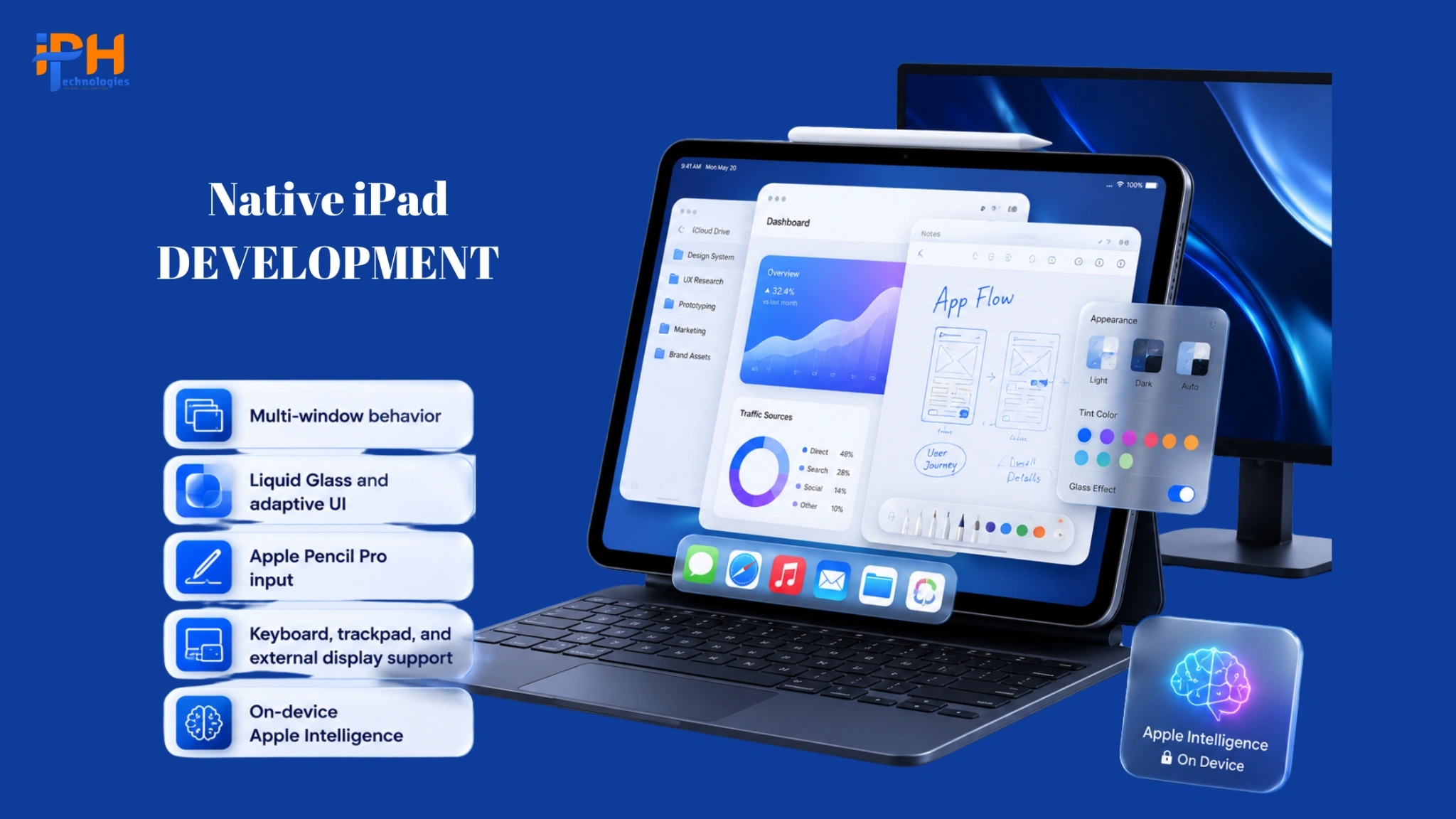
A genuinely native iPad experience today has to account for things an iPhone app never touches:
- Multi-window behavior. iPadOS 26’s tiling system lets users run several apps side by side and drag windows between them. An app that doesn’t respond intelligently to being resized, tiled, or moved into Slide Over looks broken next to apps that do.
- Liquid Glass and adaptive UI. The new design language is contextual and responsive to the content and user interaction, not just a set of visual styles. Icons, controls, and navigation elements are designed to be adaptive and work across light, dark, and new clear modes, fundamentally changing the requirements for building UI components.
- Apple Pencil Pro input. Hover, barrel roll, and pressure sensitivity are now standard expectations in creative, note-taking, annotation, and field-service apps — not premium add-ons.
- Keyboard, trackpad, and external display support. The iPad is becoming big as a laptop replacement, including with large external displays. Apps that do not cater to this scenario, for example, by only supporting touch, are wasting their potential on power users who are willing to pay for a subscription or enterprise license.
- On-device Apple Intelligence. Summarization, Live Translation, and Shortcuts actions are now platform-level hooks. Apps which expose the right entry points benefit from system-level AI without having to build and host their own models.
None of this is even remotely impressive. It’s just expected. A development partner asking you about your intentions for windowing, external displays and Pencil compatibility when pitching a project is like asking an iPhone about its intentions for an iPad.
Core Services to Expect From a Real iPad Development Partner
| Service Area | What It Should Include | Why It’s Non-Negotiable |
|---|---|---|
| Discovery & UX Strategy | Workflow mapping, wireframes, prototype testing on actual tablet dimensions | Tablet layouts fail when they’re iPhone screens stretched wider — this has to be designed for, not scaled |
| Swift/SwiftUI App Development | Native iPadOS build using SwiftUI and UIKit where appropriate, built for Liquid Glass and the new windowing APIs | Native performance and system integration (multitasking, widgets, Handoff) require native code, not a wrapped web view |
| UI/UX Design for Tablet Apps | Adaptive layouts for Split View, Slide Over, and full-screen, plus external display support | The same screen has to behave correctly at three or four different widths, sometimes simultaneously |
| Apple App Store App Development | App Store Connect setup, review-guideline compliance, privacy manifests, submission and release management | Rejections and privacy-label mistakes cost weeks, not days |
| Enterprise iPad App Development | MDM/Apple Business Manager integration, SSO, offline-first data sync, role-based access | Field service, healthcare, and logistics deployments live or die on reliability without a live connection |
| Cross-Platform Mobile App Development (iOS/iPad) | Shared business logic across iPhone and iPad where it makes sense, with genuinely distinct tablet-first UI | Code-sharing should never come at the cost of the tablet experience — the layout layer still needs to be built separately |
| QA & Post-Launch Support | Device-matrix testing (iPad mini through iPad Pro, cellular and Wi-Fi), OS-update readiness, ongoing maintenance | Apple ships OS point releases every few weeks; an app that isn’t tested against betas breaks on launch day for users |
How the Build Should Actually Be Sequenced
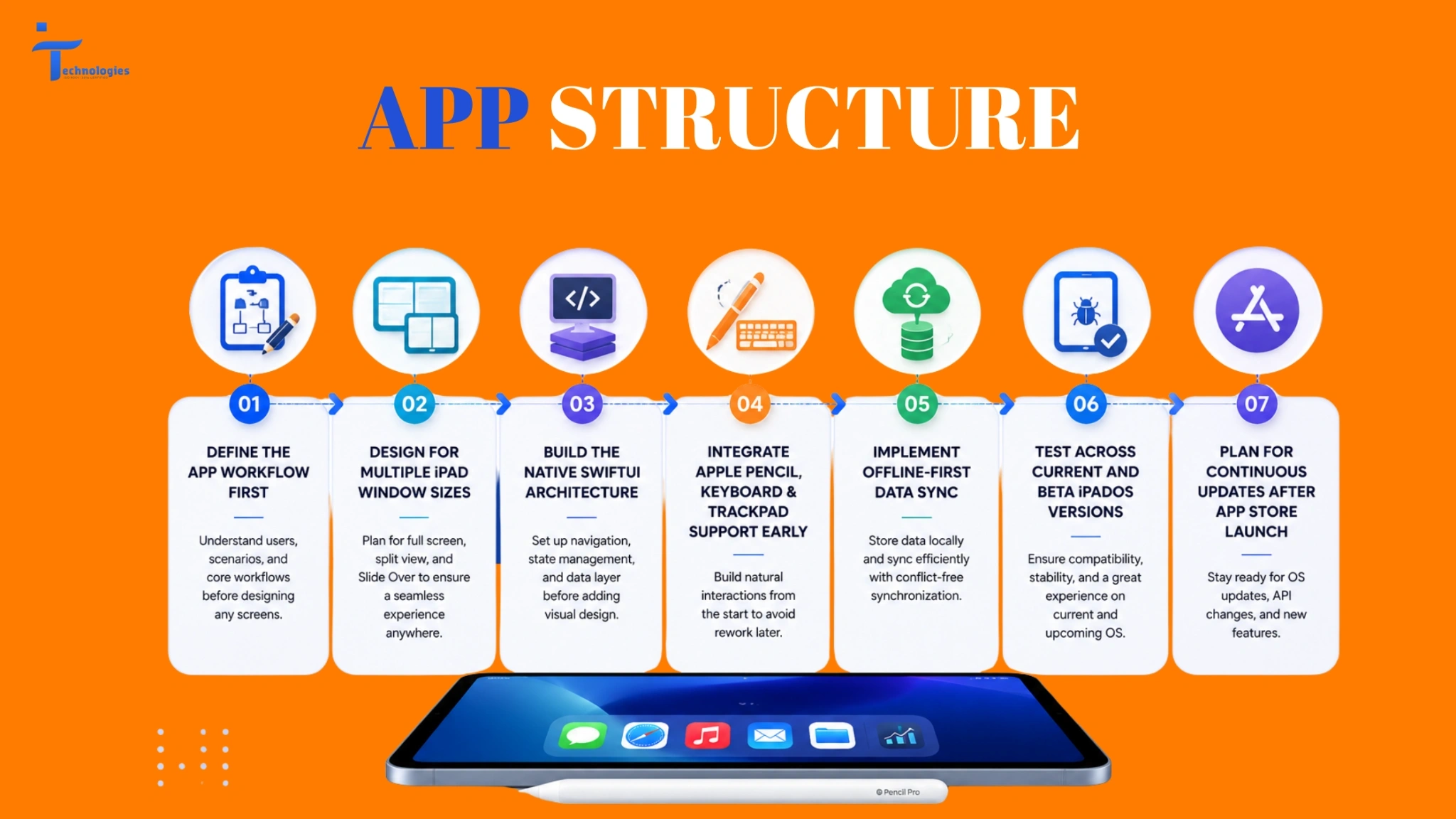
- Define the workflow, not the screen. Before even thinking about designing the UI, you have to understand the scenarios in which the app will be used. Sitting at a desk with a keyboard, standing in a warehouse, or lounging on the couch with just a finger? iPad apps have the broadest distribution of any Apple product.
- Design for at least three widths at once. Full screen, half-split, and Slide Over are no longer edge cases: with the new tiling in iPadOS 26, a user can realistically have your app in any of those states within a single session.
- Build the native shell first. Establish the SwiftUI navigation structure, state management, and data layer before layering on visual polish. Liquid Glass styling applied to a poorly structured app will result in an aesthetically pleasing disaster.
- Wire in Pencil, keyboard, and trackpad input early. Retrofitting pencil hover states or keyboard shortcuts after the UI is finished “”almost always”” requires reworking fundamental interaction patterns.
- Handle offline and sync from day one. Anything enterprise-facing (field service, inspection, healthcare, logistics, etc.) is local-first data storage with conflict-free synchronization, not the other way around, and certainly not relying on continuous connection.
- Test against the current and beta OS. Apple’s fall release cycle means that any app “frozen” in July must already be validated against what’s coming in iPadOS 27, and not merely what’s shipping today.
- Submit, then plan for the next OS cycle immediately. App Store approval is not a final destination. Apple’s maintenance updates (such as 26.5 and 26.6) frequently include changes to system search, permissions, and APIs that your app uses.
Read More:
Apple’s AI Evolution: What Developers and Businesses Should Expect from WWDC 2026
What It Costs to Hire iPad App Developers in 2026
| Build Type | Typical Scope | Typical Range | Typical Timeline |
|---|---|---|---|
| MVP / Single-Purpose App | Core workflow, native SwiftUI UI, basic backend integration | $20,000 – $70,000 | 8 – 14 weeks |
| Mid-Complexity App | Multi-window support, Pencil integration, offline sync, third-party integrations | $70,000 – $180,000 | 4 – 6 months |
| Enterprise iPad App | MDM/ABM deployment, SSO, role-based access, custom hardware or workflow integrations, ongoing SLA support | $180,000 – $400,000+ | 6 – 10 months |
Costs are determined by the presence of custom backend processes, third-party system integration (ERP, CRM, EHR), and the complexity of offline/synchronization logic – the same factors that dictate the cost of invoicing, logistics, and other data-heavy enterprise software.
Where Enterprise iPad Projects Actually Go Wrong
Three patterns show up again and again across enterprise deployments, and none of them are about visual design:
Treating offline mode as an afterthought. Field teams, clinicians and warehouse staff can’t always be connected to the internet. An app that requires connection fails precisely when it is needed the most and retrofitting an app to handle sync correctly usually results in a complete rewrite of the data layer.
Skipping device and OS-version testing discipline. With iPad, ranging in sizes from mini to pro across multiple OS versions, and Apple putting point releases on a regular schedule, a build that works on the latest pro in the latest OS is often broken across all other devices.
Ignoring deployment mechanics. Enterprise iPads are deployed through Apple Business Manager and MDM, not the public app store workflow that consumers are used to. Teams that wait until the middle of the project to think about these wasted weeks that could have been spent on other work, and end up with a host of provisioning and configuration issues that should have been solved in week one.
The practical takeaway is that features like those in the previous examples (and there were many) are rarely what ultimately determines whether your application will be able to retain users. Rarely are you going to hear a user shouting, “Hey, I love your product!” just because it had a nice onboarding tutorial. In a fintech app like the secure real estate loan management platform we developed in one of our case studies, the critical features (which most would not even consider noteworthy) ultimately dictated the product’s fate.
Choosing a Development Partner: Questions Worth Asking Before You Sign
- Have they shipped apps that use iPadOS’s multi-window and Slide Over behavior correctly, or only apps that ignore it?
- Can they speak specifically to SwiftUI and the current Liquid Glass design system, not just “iOS development” in general terms?
- Do they have a plan for Apple Business Manager and MDM deployment if the app is going to an internal team rather than the public App Store?
- What’s their process for testing against Apple’s beta OS releases before each fall update ships?
- What does post-launch support actually include – is it bug fixes only, or ongoing compatibility work as Apple updates iPadOS?
An iPad build is not a build-once deliverable. Apple’s release cadence, with major versions ship each fall plus several maintenance updates throughout the year, means your app requires a substantial maintenance plan in addition to a launch plan
IPH Technologies can develop native SwiftUI apps for iPad ranging from simple MVPs to multi-platform enterprise software with MDM and offline-first capabilities. If you are considering a similar product, feel free to contact our iPad app development company to review the ideas described above during the discovery phase.