



































































































An app should earn its place on a phone. Before you build one, find a task customers or staff do again and again: reorder items, manage appointments, approve work, track deliveries, or view account data. Then ask whether a mobile product would do that job better than your current site or process.A mobile app can help your business increase customer engagement, reach more users, simplify repeat purchases, speed up field work, support offline tasks, grow revenue, and reduce routine support requests. For example, a retailer can let customers reorder favourite items with one tap, while a field services company can enable staff to complete inspections and upload photos even when offline. The strongest case starts with one recurring task and a measurable improvement.
When Does Your Business Need a Mobile App?
Start with a prototype if users regularly need features such as offline access, photo capture, barcode scanning, or timely service alerts. If people use your service occasionally and can already finish the task on a responsive website, improve that experience first.
What Mobile App Development Services Include
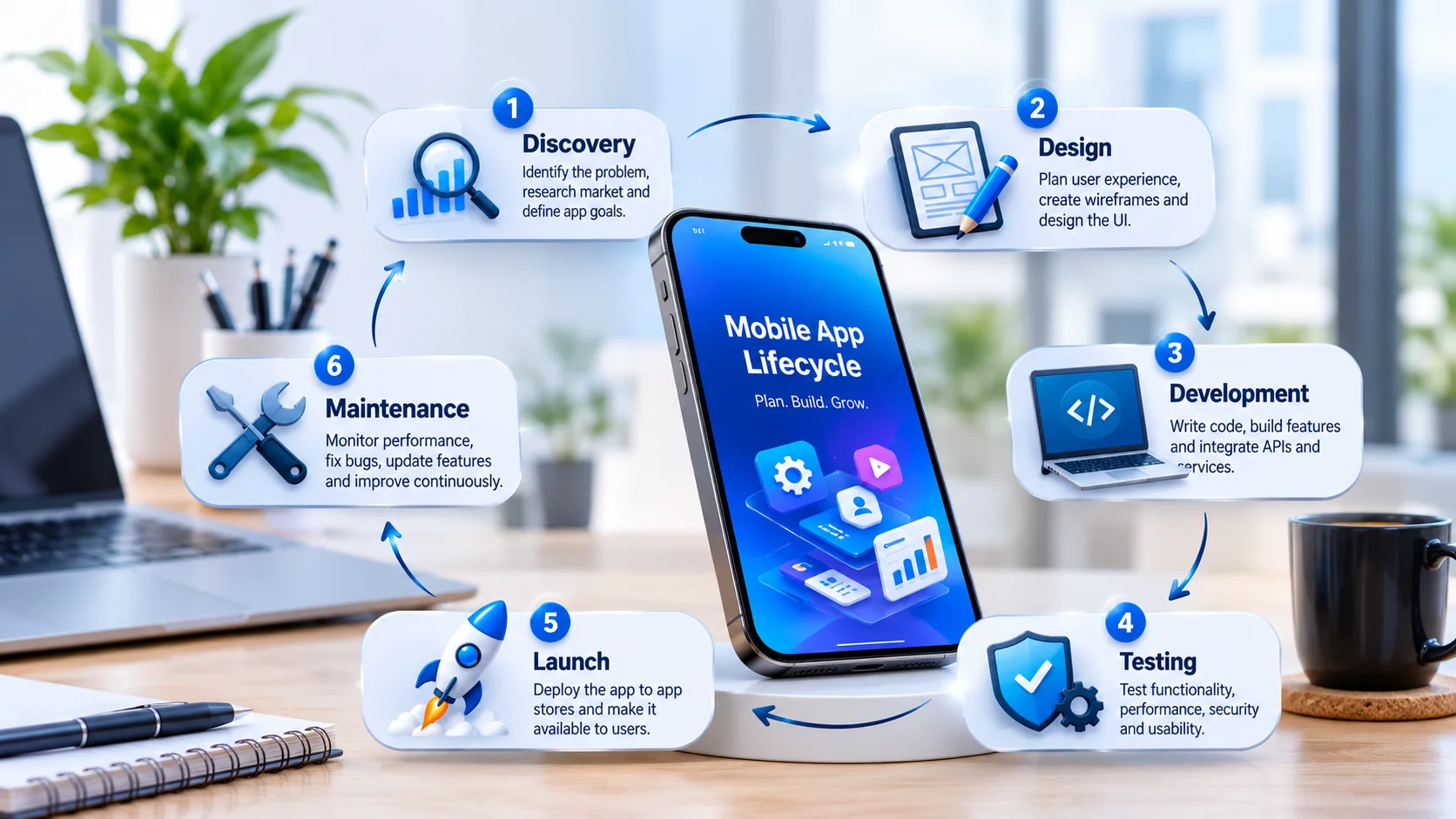
Mobile app development services will generally cover discovery, design, engineering, testing, launch and then maintenance. The stages that are typically the most expensive and/or variable are engineering, integration with the back end and then of course ongoing maintenance (all due to the complexity of the features and the level of support required post launch). Find out who owns the back end integrations, the release approvals and the post launch support.A good service scope should include these stages:
- Discovery: Define the users, the business goals, the constraints and the smallest useful release. Ask for clear assumptions and a prioritised feature list.
- Experience design: map the key journeys and test the prototypes. You need to include the errors, the empty screens, the account recovery, the access requirements etc. not just the ideal journey.
- Engineering: Build the app and the required integrations. Work out what needs to be changed in the existing systems prior to the mobile features being able to work.
- Quality assurance: agree on the supported devices, run the acceptance tests, do the performance checks and do the security review.
- Release and operation: Assign ownership for deployment, monitoring, support, maintenance and future changes.
The build method should be one that suits your business needs. Tools such as Flutter enable you to write code once and then deploy it to a range of platforms (android, ios etc) which obviously saves you a lot of time and effort as you wouldn’t otherwise be writing the same code for each platform. React Native is another tool which allows you to write the same code for a lot of the app, whilst still being able to use platform specific features. That said you’re still going to need to go and check that everything works as expected on each platform as there will be differences in things such as how notifications work or how the app is actually displayed. (docs.flutter.dev)Use the comparison below to guide talks instead of choosing a method by name alone:
| Approach | What it means | What to review |
|---|---|---|
| Native development | Platform-first work, such as Swift-based Apple apps or Kotlin-based Android interfaces | Needed platform features, team skill, and separate platform plans |
| Cross-platform development | Framework-based work that shares much of the code across platforms | Native integrations, plugin support, and platform-specific testing |
| Hybrid development | Web code that runs inside a native shell or container | Interface behavior, plugin quality, and access to device features |
| Progressive web app | A web-delivered experience with install options that vary by browser and platform | Browser support, install flow, and needed features |
Apple document Swift and SwiftUI for their platforms. React Native documents Kotlin/Java views for Android. Capacitor provides a web-focused native shell with access to device functionality via plugins. web.dev has an explanation of the platform gaps in the PWA install flows. They’re all different delivery models, not the same thing.
1. Improve Customer Engagement
Customer engagement is absolutely worth the spend if the app is enabling people to do something they already care about. You need to build around that value before you start talking about alerts, loyalty or any other personal touch. A useful goal might be to enable the customer to manage their own booking rather than just get them to open the app more.Direct Communication Channels should connect messages to clear needs. Plan reminders for appointments, updates about requested services, or replies to support questions. Give each message a place inside the app so users can act without hunting through menus. Android’s quality guidance calls for relevant alerts and the right notification channels, which supports a selective rather than broad approach. IPH Technologies example. FlagCart’s founder said the IPH team built the iPhone version of a bigger project, improved the design and helped with the App Store submission issues. Ask for a walk through of a similar launch to get a clear picture of how your team and the developer would split the work.Improved User Experience absolutely deserves the same attention. What happens when someone half ways through a form abandons it? What happens when they lose connection? What happens when they come back after a few days? Android’s quality guidance on this is very clear: you need to deal with user state, no data loss, readable screens and accessible controls. Use those rules as your input for your acceptance tests rather than treating polish as something you do at the end. (developer.android.com)Build a measurement plan around useful behaviour:
- Activation: the very first action that demonstrates value (e.g. confirming an appointment rather than just registering).
- Task completion: track whether users actually complete the journey you intended to improve and where they drop off.
- Repeat usefulness: check whether people come back when the need arises, using a cadence that is appropriate to the service.
- Communication quality: Check your alert settings, opt-outs and actions prior to expanding your messaging.
Avoid making daily use the default goal. A service used once a month should not need false reasons to interrupt customers every day. Ask your delivery partner to connect analytics events to the product’s real purpose, then review the results with support notes and usability findings.The practical benefit to chase is a relationship built on usefulness. Keep the brief simple: fewer barriers between a customer’s intent and a successful result.
2. Reach More of Your Target Audience
Expanding reach means making your service usable for the people you want to serve. Treat platform reach, device fit, access, language, and work conditions as separate choices. Publishing an app is only one part of reach; your plan must also explain how people will find it and why they should try it.Targeting Multiple Devices begins with audience research. Ask which devices your customers or staff use, whether they own them or the company does, and which screen sizes matter. Android’s adaptive guidance covers many shapes and resizable windows, so device testing is broader than checking one phone layout. (developer.android.com)Turn that research into a support matrix. List the device types and operating system versions you plan to test, then ask the provider to explain the work that follows. If a shared-code approach is proposed, ask for a demo of your hardest interaction on each key platform before you commit to the full build.Global Accessibility should be a product choice, not a launch slogan. For each market, check:
- Language and content: Which screens, instructions, support materials, and alerts need translation and local review.
- Regional experience: Date formats, currencies, address fields, payment choices, and service rules.
- Access needs: Readable text, clear labels, contrast, navigation, and assistive-tech use.
- Work conditions: The key journey on real devices and real connections, not ideal ones only.
Google’s app quality guidance includes concrete rules for contrast, touch targets, and content descriptions. Use those rules to guide design reviews, while still testing the full experience with the users you want to serve. (developer.android.com)Keep the business limits visible. If your company cannot deliver a service in a location, the app should say so before asking someone to register or buy. Have the right specialists check legal and privacy rules before you enter a new market.Finally, plan for acquisition separately from build work. Decide where you will introduce the app—your website, service emails, account area, sales talks, or campaigns—and measure the quality of users each route brings. Reach only matters when the right people can access and finish a useful experience.
3. Make Repeat Purchases Easier
For customers who buy the same items regularly, an app can surface order history, saved lists, and compatible products in one place. An equipment supplier, for example, could let customers scan a part number and add the correct replacement to a saved order.Compare time to reorder, order corrections, and completion rates with the existing mobile website. This gives you a baseline for deciding whether the app makes repeat buying easier.
4. Streamline Field Work and Approvals
Work improvement is a strong use case when mobile access clears a real bottleneck. Start with a workflow staff can describe clearly: receiving an assignment, collecting evidence, checking inventory, or asking for approval. Map the current process before you decide which parts belong in an app.Automation of Processes should begin with rules and exceptions. For a proposed inspection flow, define required fields, supporting photos, review ownership, and the conditions that should stop submission. Then identify which steps need human judgment. Do not automate an unclear process and expect the app to sort out ownership disputes.Build the business case from observed work. Ask staff where they re-enter information, wait for confirmation, or fix incomplete records. Pick one repeatable problem, set a baseline, and test whether a prototype solves it without adding extra admin elsewhere.Integration of Mobile Solutions needs careful scope. Ask the provider to document which system owns each record, what the mobile screen may change, and what happens when a request fails. Treat connecting to the CRM as the start of a requirements talk, not a full spec.Before you approve an integration, answer these questions:
- Data ownership: which system is the final one and who can resolve the issue of disputed or duplicate records?
- Failure handling: what do users see when a request can’t complete and what’s the process for them to safely try again?
- Access control: which roles can view, create, edit, approve and export the data?
- Work ownership: who owns the failure and decides whether it’s the app’s fault, the integration’s fault or the source system’s fault?
Include security review in that planning. OWASP’s Mobile Application Security Verification Standard groups controls for storage, sign-in, network communication, and platform interaction. Ask the provider to explain the controls that matter for your app and how they will be checked. Run a small pilot with real staff before broad rollout. Review incomplete submissions, correction work, approval delays, and the time people spend switching tools. Invite frontline users to point out cases the first process map missed.The goal should be a better workflow, not just a paper form on a smaller screen. If the pilot exposes a policy or data problem, fix that before you expand the app.
5. Keep Critical Tasks Available Offline
A field inspection app can be used to have the team go through a checklist and take photos in areas of poor connectivity. It can save their work on the device and then sync it up when connectivity is restored.Agree on which tasks must work offline, how the user will see pending uploads and what happens if two people are editing the same record. Run a pilot with tests of interrupted uploads and measure the frequency with which staff are able to complete an inspection without having to re-enter the data.
6. Grow Revenue Through New Offers
Revenue growth needs a tighter plan than launch an app and sell more. Decide whether the product will support current sales, create a paid offer, improve repeat buying, or cut service costs. Give the first release one main business idea so you can read the result clearly.Consider these revenue plans in relation to the experience:
- Commerce: Test whether the app makes choosing, buying, or reordering easier. Show where the mobile journey is better than the current one.
- Subscriptions: Find the ongoing value customers would pay to access, then test the offer and renewal flow.
- Paid features: Separate a truly useful premium feature from features people need to use the core service.
- Transaction-based revenue: Define the service around each deal and the work it creates over time.
- Ads or sponsorship: Check whether paid placements fit the product’s purpose without blocking key tasks.
Do not choose a model just because another app uses it. Interview likely buyers, test price ideas with good research, and include support and work costs in the review. Ask the delivery team to review platform rules before you lock in payment and purchase flows.Validate the offer before investing in platform-specific features. Start with one revenue model and define the action that would show customers are willing to pay, such as starting a paid trial or upgrading a plan.For ROI planning, compare direct gains with the full cost of ownership. Include discovery, build, integration, infrastructure, testing, support, maintenance, and acquisition. Separate sales that moved from another channel from sales that are truly extra, and use contribution rather than gross revenue when you judge value.
For example, imagine you spend $60,000 to build and launch your app, including all support and maintenance for the first year. If you project that the app will bring in an additional 90,000innetnewsales,theestimatedROIforthefirstyearis(90,000 – $60,000) / $60,000 = 0.5, or 50 percent. In another scenario, if your app helps your support team handle 1,200 fewer calls each year, saving about $25,000 in staff costs, that savings also factors into your ROI. Use your own cost estimates and revenue or savings projections to validate whether the app will be a worthwhile investment.Set up a measurement plan before launch. Define the purchase or revenue event, the comparison period, the customer groups, and the assumptions that could change the result. Where you can, use a phased rollout or a fair comparison group instead of tying every later sales change to the app.Review cost savings separately, using solid measures such as verified changes in handling time or support load. Avoid counting the same gain twice. The strongest business case is not the most optimistic forecast; it is one whose assumptions you can inspect, test, and update.
7. Reduce Routine Support Requests
Let customers check order status, reschedule appointments, or retrieve service records on their own. Start with a frequent request that your team can resolve from reliable data, and provide a clear route to a person when the app cannot resolve it.Track support contacts per order or appointment, self-service completion, and repeat contacts. Compare these measures with the baseline to see whether customers are resolving their requests more easily.
How to Choose a Mobile App Development Partner
Ask shortlisted providers to walk through a comparable project. Look for how they tested the riskiest workflow, handled integrations, and planned the release and ongoing maintenance.Experienced developers should be able to talk about hard conditions, not just show a smooth happy path. Ask about interrupted submissions, expired sessions, unavailable integrations, access, and recovery from failures. Use the answers to judge whether the proposal fits the product people will actually use.Compare providers with a practical checklist:
- Discovery and scope: Ask for written assumptions, exclusions, acceptance criteria, and a change-approval process.
- Communication: Agree on decision-makers, demos, progress reports, and how risks will be raised.
- Security verification: Ask which controls and tests fit the job. OWASP separates security needs from the testing guidance used to check them.
- Ownership and access: Make sure the agreement covers source code, design files, repos, accounts, third-party licenses, docs, and handover.
- Post-launch support: Specify who handles monitoring, incident triage, maintenance releases, fit testing, and enhancement work.
Do not treat the lowest first quote as the full comparison. Ask each shortlisted provider to price the same scope and explain ongoing work. Separate warranty fixes from maintenance and new build work so you know what happens after acceptance.Write a short brief that names the audience, the recurring task, the desired outcome, and the key integrations. Use it to scope a discovery phase or a focused prototype.Discuss your app idea with IPH Technologies.