

















































Highlights
UI/UX Design
User-first, visually engaging interfaces crafted to enhance usability, boost engagement, and deliver seamless digital experiences.
Branding
Strategic brand identities that communicate your vision, build trust, and create a memorable presence across all touchpoints.
Wireframing
Structured layouts and user flows that map the product journey clearly before development begins, saving time and cost.
Prototype Design
Interactive prototypes that simulate real user interactions, helping validate ideas and refine experiences early.
Design Systems
Scalable design frameworks and reusable components that ensure consistency, speed, and efficiency across your product.
UI/UX Design

We design intuitive, user-centric interfaces that enhance engagement, improve usability, and deliver seamless digital experiences across all devices.

UI UX Design
  • User research and wireframing for clear flows
  • Modern UI design using Figma and Adobe XD
  • Interactive prototypes for better user experience testing
  • Usability testing and performance optimization improvements
  • Responsive design across all devices and screens
  • Scalable design systems with reusable UI components
Branding & Identity

We craft strong brand identities that communicate your vision, build trust, and create a lasting impression across all digital and offline touchpoints.

Branding and Identity
  • Logo design and brand identity creation
  • Brand guidelines and visual consistency systems
  • Color palette and typography selection strategy
  • Marketing materials and brand asset design
  • Social media branding and creative direction
  • Rebranding and brand positioning strategies
Wireframing

We create structured wireframes that define layout, user flow, and functionality, helping visualize ideas and build a strong foundation before design and development.

Wireframing
  • Low fidelity wireframes for initial structure
  • High fidelity wireframes with detailed layouts
  • User flow mapping for better navigation
  • Content hierarchy and layout planning
  • Clickable wireframes for early feedback
  • Clear structure before UI design phase
Prototype Design

We design interactive prototypes that simulate real user experiences, helping validate ideas, test functionality, and refine products before development.

Prototype Design
  • Interactive prototypes for real user experience
  • Clickable designs to test product functionality
  • User journey simulation for better understanding
  • Rapid prototyping for faster design validation
  • Feedback driven improvements before development
  • High fidelity prototypes with smooth interactions
Design Systems

We build scalable design systems that ensure consistency, improve collaboration, and accelerate product development across all platforms and teams.

Design Systems
  • Reusable UI components for consistent design
  • Design tokens for colors typography spacing
  • Component libraries for faster development workflow
  • Consistent branding across all digital products
  • Documentation for design and development teams
  • Scalable systems for growing product ecosystems
Highlights
Mobile Apps Development
High-performance Android and iOS mobile applications built with modern technologies, delivering seamless user experiences and robust functionality.
Desktop Application Dev
Powerful and secure desktop applications tailored for Windows, macOS, and Linux, designed for performance, scalability, and reliability.
Web App Development
Scalable and responsive web applications using modern frameworks like React, Angular, and Vue for fast, dynamic, and engaging experiences.
Cross-Platform
Cost-effective cross-platform solutions using Flutter and React Native, enabling a single codebase for both iOS and Android platforms.
PWA Development
Progressive Web Apps that combine the best of web and mobile, offering offline access, fast loading, and app-like experiences directly in the browser.
Highlights
Mobile App

Android

iOS

Flutter

Hybrid

Optimize

Native

Swift

Firebase

Android App Development

We craft powerful, scalable Android applications with intuitive UX, high performance, and deep integration with Google services.

Android App
  • Custom Android app development
  • Native Kotlin & Java apps
  • Google Play Store deployment
  • Material Design UI implementation
Kotlin

Kotlin

Java

Java

Flutter

Flutter

Android Studio

Android

Jetpack

Jetpack

iOS App Development

We build high-quality, user-centric iOS apps combining performance, security, and seamless design for Apple devices.

iOS App
  • Custom iOS app development
  • Native Swift & SwiftUI apps
  • Seamless Apple service integration
  • App Store review & deployment
Swift

Swift

SwiftUI

SwiftUI

Obj-C

Obj-C

Xcode

Xcode

Flutter

Flutter

Cross-Platform Apps

We develop cross-platform mobile apps that run flawlessly on both iOS and Android from a single codebase, saving time and cost.

Cross-Platform App
  • Single codebase for iOS & Android
  • Flutter & React Native development
  • Native-like performance & UI
  • Faster time-to-market
React Native

React Native

TypeScript

TypeScript

Redux

Redux

Firebase

Firebase

Dart

Dart

Hybrid Apps

We build hybrid mobile apps that blend web technologies with native capabilities, delivering broad reach and cost-effective development.

Hybrid App
  • Web + native feature integration
  • Ionic & Cordova frameworks
  • Reduced development costs
  • Multi-platform publishing
Flutter

Flutter

Dart

Dart

Firebase

Firebase

SQLite

SQLite

App Optimization

We enhance existing mobile apps with performance tuning, crash fixes, battery efficiency, and faster load times for a superior user experience.

App Optimization
  • Performance profiling & tuning
  • Memory & battery optimization
  • Crash analysis & bug fixing
  • App size reduction & load speed
Xcode

Xcode

Android Studio

Android

Firebase

Firebase

Java

Java

Highlights
Desktop App

Windows

macOS

Linux

Desktop

Electron

Qt

WinForms

GTK

Windows Apps

We develop robust Windows desktop applications using modern Microsoft technologies, delivering powerful tools for enterprise and consumer use.

Windows App
  • Custom Windows desktop applications
  • WPF & WinForms development
  • Microsoft Store deployment
  • Windows API & system integration
C#

C#

.NET

.NET

Electron

Electron

Visual Studio

Visual Studio

SQL Server

SQL Server

macOS Apps

We create elegant, high-performance macOS applications that leverage Apple's native frameworks for a smooth and delightful desktop experience.

macOS App
  • Native macOS app development
  • SwiftUI & AppKit integration
  • Mac App Store submission
  • Apple Silicon optimization
Swift

Swift

SwiftUI

SwiftUI

Obj-C

Obj-C

Xcode

Xcode

Cross-Platform Desktop

We develop cross-platform desktop applications that run seamlessly on Windows, macOS, and Linux from a single shared codebase.

Cross-Platform Desktop
  • Single codebase for all platforms
  • Electron & Tauri frameworks
  • Flutter for desktop support
  • Consistent UI across OS environments
Flutter

Flutter

Electron

Electron

Node.js

Node.js

TypeScript

TypeScript

Docker

Docker

Electron Apps

We build feature-rich Electron desktop apps using web technologies, enabling cross-platform deployment with native OS capabilities.

Electron App
  • Electron framework development
  • Node.js & Chromium integration
  • Auto-updater & native notifications
  • Cross-OS packaging & distribution
Electron

Electron

Node.js

Node.js

React

React

Vue

Vue

TypeScript

TypeScript

Highlights
Web App

React

Node.js

PHP

Laravel

Python

MySQL

JavaScript

HTML

CSS

React Development

We build fast, component-driven React web applications with modern state management, reusable UI, and seamless API integration.

React Development
  • Custom React SPA development
  • Redux & Context API state management
  • Next.js SSR & SSG support
  • REST & GraphQL API integration
React

React

Next.js

Next.js

Redux

Redux

TypeScript

TypeScript

Tailwind

Tailwind

Angular Development

We develop enterprise-grade Angular applications with structured architecture, two-way data binding, and robust TypeScript foundations.

Angular Development
  • Custom Angular SPA development
  • RxJS & NgRx state management
  • Angular Material UI components
  • Lazy loading & performance tuning
Angular

Angular

TypeScript

TypeScript

HTML

HTML

CSS

CSS

NPM

NPM

Node.js Backend

We build scalable, event-driven Node.js backends with RESTful APIs, real-time capabilities, and seamless database integrations.

Node.js Backend
  • RESTful & GraphQL API development
  • Express.js & Fastify frameworks
  • WebSocket & real-time features
  • MongoDB, PostgreSQL integration
Node.js

Node.js

Express

Express

MongoDB

MongoDB

GraphQL

GraphQL

Docker

Docker

Cloud Web Apps

We design and deploy cloud-native web applications on AWS, Azure, and GCP — scalable, secure, and built for high availability.

Cloud Web Apps
  • AWS, Azure & GCP deployment
  • Serverless architecture development
  • Auto-scaling & load balancing
  • CI/CD pipeline configuration
AWS

AWS

Azure

Azure

GCP

GCP

Docker

Docker

Kubernetes

Kubernetes

Full-Stack Dev

We deliver complete full-stack web solutions — from pixel-perfect frontends to robust backends — as a unified, end-to-end product.

Full-Stack Dev
  • Frontend & backend development
  • MERN & MEAN stack expertise
  • Database design & API architecture
  • DevOps, hosting & deployment
React

React

Node.js

Node.js

MongoDB

MongoDB

PostgreSQL

PostgreSQL

Docker

Docker

Highlights
Cross Platform

Flutter

R. Native

Xamarin

Ionic

Reuse

Electron

NW.js

Framework7

SwiftUI

Flutter Development

We build beautiful, natively compiled Flutter applications for mobile, web, and desktop from a single Dart codebase with pixel-perfect UI.

Flutter Development
  • Flutter mobile & web apps
  • Dart language development
  • Custom widget & animation creation
  • Firebase & REST API integration
Flutter

Flutter

Dart

Dart

Firebase

Firebase

GetX

GetX

Riverpod

Riverpod

React Native

We develop high-performance React Native apps that deliver a truly native experience on both iOS and Android using JavaScript and React.

React Native
  • Cross-platform iOS & Android apps
  • React Native CLI & Expo development
  • Native module & bridge integration
  • Redux & MobX state management
React Native

React Native

Redux

Redux

TypeScript

TypeScript

Firebase

Firebase

Xamarin

We develop Xamarin-based cross-platform apps using C# and .NET, enabling shared business logic across iOS, Android, and Windows.

Xamarin
  • Xamarin.Forms & MAUI apps
  • Shared C# codebase development
  • Native API access via bindings
  • Enterprise app integration
Xamarin

Xamarin

C#

C#

.NET MAUI

.NET

Azure

Azure

Visual Studio

Visual Studio

Ionic Framework

We create stunning Ionic applications that combine the power of web technologies with native device features for a seamless mobile experience.

Ionic Framework
  • Ionic Angular & React apps
  • Capacitor native plugin integration
  • Responsive mobile-first UI
  • PWA & hybrid app deployment
Ionic

Ionic

Angular

Angular

React

React

Vue

Vue

Code Reusability

We build reusable app architectures, reducing duplication, accelerating development, and ensuring seamless cross-platform consistency.

Code Reusability
  • Shared component library creation
  • Monorepo architecture setup
  • Design system implementation
  • Platform-agnostic business logic
Turborepo

Turborepo

Storybook

Storybook

Flutter

Flutter

React Native

React Native

Highlights
PWA

PWA

Offline

Push

Fast

App-Like

IndexedDB

Installable

Sync

Progressive Web Apps

We build Progressive Web Apps that combine the best of web and mobile — installable, reliable, and fast across all devices and browsers.

Progressive Web Apps
  • PWA architecture & manifest setup
  • Service worker implementation
  • Installable & home screen support
  • Cross-browser compatibility
HTML5

HTML5

CSS3

CSS3

JavaScript

JavaScript

Workbox

Workbox

Lighthouse

Lighthouse

Offline Support

We implement robust offline capabilities in your web apps using service workers and smart caching so users stay productive without connectivity.

Offline Support
  • Service worker caching strategies
  • IndexedDB offline data storage
  • Background sync implementation
  • Graceful offline fallback pages
Service Worker

ServiceWorker

Workbox

Workbox

IndexedDB

IndexedDB

Cache API

Cache API

Background Sync

BackgroundSync

Push Notifications

We integrate web push notification systems into your PWA to re-engage users with timely, personalized alerts even when the app is not open.

Push Notifications
  • Web Push API implementation
  • VAPID key & subscription management
  • Notification scheduling & targeting
  • Cross-browser push support
Web Push

Web Push

Firebase FCM

Firebase

OneSignal

OneSignal

Node.js

Node.js

Workbox

Workbox

Fast Loading

We optimize PWAs for lightning-fast load times using code splitting, lazy loading, and caching to deliver exceptional Core Web Vitals scores.

Fast Loading
  • Code splitting & lazy loading
  • Image & asset optimization
  • Core Web Vitals improvement
  • CDN & caching configuration
Webpack

Webpack

Lighthouse

Lighthouse

Vite

Vite

Cloudflare

Cloudflare

Workbox

Workbox

App-Like Experience

We craft PWAs that feel and behave like native mobile apps — with smooth animations, full-screen mode, gestures, and seamless transitions.

App-Like Experience
  • Full-screen & standalone display mode
  • Touch gestures & swipe navigation
  • Smooth page transitions & animations
  • App shell architecture
Web Manifest

Web Manifest

CSS Animations

CSS

Framer Motion

FramerMotion

React

React

Vue

Vue

Highlights
Custom Software
Fully tailored software solutions designed to match your unique business processes, improving efficiency and driving long-term growth.
Backend Systems
Robust and secure backend architectures built for high performance, scalability, and seamless integration with your applications.
Database Design
Efficient and scalable database structures optimized for fast queries, data integrity, and reliable performance at scale.
Cloud-Native
Modern cloud-native solutions using microservices and serverless architecture on AWS, Azure, and GCP for maximum flexibility and scalability.
API Development
Secure and well-documented RESTful and GraphQL APIs that enable seamless communication between systems and third-party integrations.
Custom Software

We develop tailored software solutions that align with your business goals, streamline operations, and deliver scalable, high-performance digital systems.

Custom Software Development
  • Custom software tailored to business needs
  • Scalable architecture for long term growth
  • Secure and high performance application development
  • API integration with third party services
  • Cloud based and enterprise software solutions
  • Ongoing maintenance and system optimization support
Backend Systems

We build robust backend systems that power applications with secure, scalable architecture, efficient data handling, and seamless integrations.

Backend Systems
  • Secure backend architecture and system design
  • Database design and performance optimization
  • API development for seamless integrations
  • Authentication and authorization system implementation
  • Server side logic and business workflows
  • Scalable infrastructure for high traffic applications
Database Design

We design efficient database structures that ensure data integrity, optimize performance, and support scalable, reliable application systems.

Database Design
  • Structured database schema design and planning
  • Efficient data modeling for scalable systems
  • Database optimization for faster query performance
  • Relational and non relational database solutions
  • Secure data storage and access management
  • Backup strategies and data recovery solutions
Cloud-Native Apps

We build cloud-native applications designed for scalability, resilience, and flexibility using modern cloud infrastructure and microservices architecture.

Cloud Native Apps
  • Cloud first architecture for scalable applications
  • Microservices based system design and deployment
  • Containerization using Docker and Kubernetes tools
  • Auto scaling infrastructure for high availability
  • Continuous integration and continuous deployment pipelines
  • Secure cloud environments with monitoring and logging
API Development

We develop secure and scalable APIs that enable seamless communication between systems, applications, and third party services.

API Development
  • RESTful API development for web applications
  • Secure API authentication and authorization systems
  • Third party API integration and data exchange
  • Scalable APIs for high traffic applications
  • API documentation for easy developer integration
  • Performance optimization and API response tuning
Highlights
Manual Testing
Detailed human-driven testing to uncover edge cases, validate user flows, and ensure a seamless, intuitive user experience.
Test Automation
Automated testing frameworks using Selenium, Cypress, and Appium to accelerate regression cycles and improve release confidence.
Performance
Load, stress, and scalability testing to ensure your application performs reliably under high traffic and demanding conditions.
Security Testing
Comprehensive security assessments including penetration testing and vulnerability analysis to safeguard your application.
Mobile QA
End-to-end mobile application testing across devices and platforms to ensure consistent performance, usability, and stability.
Manual Testing

We perform detailed manual testing to ensure software quality, identify issues early, and deliver reliable, user-friendly applications.

Manual Testing
  • Functional testing for application core features
  • UI testing for consistent user experience
  • Cross browser and device compatibility testing
  • Test case creation and execution processes
  • Bug tracking and detailed issue reporting
  • Regression testing after feature updates
Test Automation

We implement automated testing solutions to improve efficiency, reduce manual effort, and ensure faster, reliable software delivery.

Test Automation
  • Automated test scripts for faster execution
  • Regression testing using automation frameworks
  • Continuous testing within CI CD pipelines
  • Test coverage improvement across application modules
  • Reusable automation scripts for long term scalability
  • Performance and load testing automation solutions
Performance Testing

We evaluate application performance to ensure speed, stability, and scalability under different workloads and real-world conditions.

Performance Testing
  • Load testing for high traffic scenarios
  • Stress testing to identify system limits
  • Performance benchmarking and response time analysis
  • Scalability testing for growing user demands
  • Memory and resource usage optimization checks
  • Bottleneck identification and performance improvements
Security Testing

We identify vulnerabilities and secure applications against threats, ensuring data protection, compliance, and safe user interactions.

Security Testing
  • Vulnerability assessment and risk analysis testing
  • Penetration testing to identify security gaps
  • Authentication and authorization security validation
  • Data protection and encryption testing processes
  • Secure code review and security best practices
  • Compliance testing with industry security standards
Mobile QA

We ensure mobile applications deliver flawless performance, usability, and compatibility across devices, platforms, and environments.

Mobile QA
  • Mobile app testing across multiple devices
  • iOS and Android platform compatibility testing
  • UI testing for consistent mobile experience
  • Network and performance testing on mobile
  • App usability and user experience validation
  • App store readiness and release testing
Highlights
CI/CD Pipelines
Automated pipelines for building, testing, and deploying code, enabling faster releases, fewer errors, and continuous delivery.
Infrastructure
Scalable infrastructure provisioning using Infrastructure as Code (IaC) with Terraform and CloudFormation for consistency and reliability.
Deployment
Zero-downtime deployment strategies including blue-green and rolling deployments to ensure smooth and reliable releases.
Containerisation
Container-based architectures using Docker and Kubernetes for portability, scalability, and efficient resource utilization.
Monitoring
Real-time monitoring and observability using tools like Grafana, Prometheus, and Datadog to ensure system health and performance.
CI/CD Pipelines

We implement CI/CD pipelines to automate build, testing, and deployment, enabling faster releases, improved quality, and continuous delivery.

CI CD Pipelines
  • Automated build and deployment pipeline setup
  • Continuous integration for faster code validation
  • Continuous delivery for seamless release cycles
  • Integration with Git version control systems
  • Automated testing within CI CD workflows
  • Monitoring and rollback strategies for deployments
Infrastructure

We design and manage reliable infrastructure to ensure scalability, security, and high availability for modern applications and systems.

Infrastructure
  • Cloud infrastructure setup and configuration services
  • Server management and deployment automation solutions
  • High availability and load balancing implementation
  • Monitoring and logging for system performance tracking
  • Security hardening and infrastructure access controls
  • Scalable environments for growing application demands
Deployment

We manage seamless deployment processes to ensure applications are delivered efficiently, securely, and ready for production environments.

Deployment
  • Application deployment to cloud and servers
  • Automated deployment workflows for faster releases
  • Environment configuration and setup management
  • Version control and release management processes
  • Rollback strategies for safe deployment updates
  • Post deployment monitoring and performance checks
Containerization

We use containerization to package applications for consistency, scalability, and efficient deployment across different environments.

Containerization
  • Application containerization using Docker technologies
  • Environment consistency across development and production
  • Container orchestration with Kubernetes platforms
  • Scalable container deployment for microservices architecture
  • Efficient resource utilization and system isolation
  • Integration with CI CD pipelines for automation
Monitoring

We monitor systems and applications in real time to ensure performance, reliability, and quick issue detection and resolution.

Monitoring
  • Real time system performance monitoring tools
  • Application health checks and uptime tracking
  • Error tracking and issue alerting systems
  • Log management and analysis for debugging
  • Resource usage monitoring across infrastructure layers
  • Proactive issue detection and incident response
Highlights
Roadmap Planning
Strategic product roadmaps aligned with business goals, helping prioritize features, manage timelines, and deliver maximum value.
Team Coordination
Efficient coordination across design, development, and QA teams to ensure smooth collaboration and on-time project delivery.
Growth Strategy
Data-driven product strategies focused on user acquisition, retention, and continuous improvement to drive sustainable growth.
Agile Sprints
Agile methodologies like Scrum and Kanban to deliver iterative releases, improve flexibility, and maintain predictable progress.
Stakeholder Mgmt
Clear communication and alignment with stakeholders through regular updates, reporting, and feedback loops to ensure project success.
Roadmap Planning

We create strategic roadmaps that align with your business goals, helping prioritize features, plan execution, and ensure long-term success.

Roadmap Planning
  • Product roadmap planning aligned with business objectives
  • Feature prioritization based on user and market needs
  • Timeline planning for efficient project execution phases
  • Technology stack selection for scalable solutions
  • Risk assessment and mitigation strategy planning
  • Continuous roadmap updates based on performance insights
Team Coordination

We ensure smooth collaboration across teams to improve productivity, streamline workflows, and deliver projects efficiently on time.

Team Coordination
  • Cross functional team collaboration and communication
  • Agile workflow management and sprint planning processes
  • Task tracking and project progress visibility tools
  • Clear role assignment and responsibility management
  • Regular updates and performance review meetings
  • Efficient coordination between design development teams
Growth Strategy

We develop data-driven growth strategies to scale your business, increase user acquisition, and maximize long-term revenue potential.

Growth Strategy
  • Market analysis and competitive growth planning strategies
  • User acquisition and retention optimization techniques
  • Data driven decision making and performance insights
  • Scalable business models for long term expansion
  • Conversion rate optimization across digital platforms
  • Continuous growth tracking and strategy refinement
Agile Sprints

We follow agile sprint methodologies to deliver faster iterations, improve collaboration, and ensure continuous product improvement.

Agile Sprints
  • Sprint planning and backlog prioritization processes
  • Daily standups for team alignment and progress tracking
  • Iterative development with continuous feedback cycles
  • Task management using agile tools and workflows
  • Regular sprint reviews and performance retrospectives
  • Faster delivery with incremental feature releases
Stakeholder Management

We ensure clear communication and alignment with stakeholders to drive project success, transparency, and informed decision making.

Stakeholder Management
  • Regular stakeholder communication and reporting processes
  • Requirement alignment with business goals and expectations
  • Feedback collection and continuous improvement strategies
  • Transparent project updates and progress visibility
  • Risk identification and stakeholder expectation management
  • Collaborative decision making for project success

Introduction

Let’s be real — not everyone has a shiny MacBook sitting on their desk. But here’s the thing: not having a Mac shouldn’t stop you from building incredible iOS apps. In 2026, the landscape of mobile app development has shifted dramatically, and the walls that once separated Windows developers from the iOS ecosystem are crumbling fast.

Whether you’re a solo developer bootstrapping your startup, a business owner looking to cut costs, or a seasoned coder who simply prefers Windows — this guide is for you. We’re going to walk through every method, trick, and tool available to help you develop iOS apps right from your Windows machine. No Mac required. Well, almost.

At IPH Technologies, we’ve helped over 430+ satisfied clients navigate exactly these kinds of challenges. With 500+ successful projects under our belt, we understand that the right tools and the right approach can make all the difference. So buckle up — let’s dive deep.

Also read- 15 Top AI Consulting Companies in 2026 | Expert Guide & Rankings

Challenges of Developing iOS Apps Without a Mac
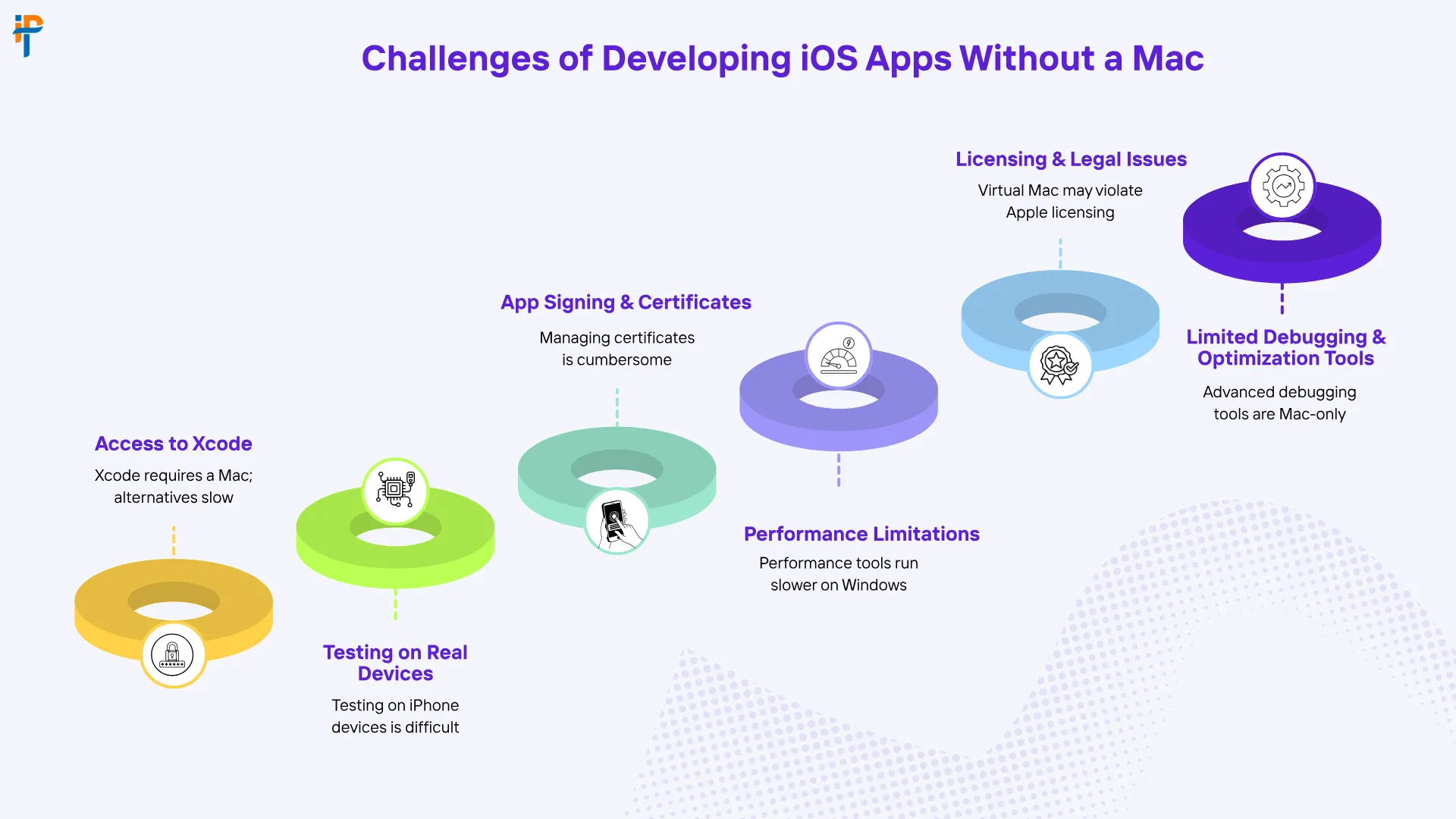

Before we get to the solutions, let’s acknowledge the elephant in the room. Developing iOS apps on Windows isn’t without its headaches. Apple has historically locked iOS development behind its own ecosystem, and that creates some real friction.

Xcode Dependency Issues

Xcode — Apple’s official IDE — is macOS-exclusive. Period. Since iOS app development traditionally relies on Xcode for compiling, building, and packaging apps, Windows users are immediately at a disadvantage. You can’t install Xcode natively on a Windows machine, which means you need workarounds, and some of them are more elegant than others. Think of it like trying to play a PlayStation-exclusive game on an Xbox — the hardware just wasn’t built for it, so you have to get creative.

Simulator and Testing Limitations

Running the iOS Simulator requires macOS. Without it, testing your app’s look and feel on various iPhone or iPad screen sizes becomes a manual, often frustrating process. You’d either need a physical iOS device or a cloud-based testing service — both of which add time and cost to your workflow. It’s doable, but it requires planning and discipline.

Code Signing and Provisioning Hurdles

Apple requires all iOS apps to be signed with valid certificates before deployment. This provisioning process is deeply tied to Xcode and macOS tools. Navigating this on Windows requires third-party services or cloud Mac environments, which can complicate your CI/CD pipeline if you’re not careful. It’s one of those things that sounds simple until you’re three hours deep into a certificate error with a deadline looming.

Top Methods to Develop iOS Apps on Windows

Now here’s where it gets exciting. There’s more than one road that leads to Rome, and there’s definitely more than one way to build an iOS app from a Windows PC. Let’s break down your best options.

Using Flutter for Cross-Platform Development

Flutter, developed by Google, is arguably the most powerful cross-platform framework available in 2026. You write your code once in Dart, and Flutter compiles it natively for iOS, Android, web, and desktop. The best part? You can write and debug most of your Flutter code on Windows. When it’s time to build the iOS-specific binary, you can connect to a remote Mac or use a cloud-based Mac service. Flutter’s hot reload feature means you see your changes instantly on a connected device — it’s like having a live preview of your imagination.

React Native on Windows

React Native is another heavyweight in the cross-platform arena. Built by Meta, it lets you write JavaScript or TypeScript code that renders native iOS and Android components. Microsoft has even maintained a React Native for Windows extension, signaling strong community support. Like Flutter, final iOS builds still require a Mac connection — but development and testing can happen largely on Windows. If your team already knows JavaScript, React Native has an incredibly low learning curve.

Virtual Machines and Cloud-Based Mac Services

This is perhaps the most direct workaround. Services like MacStadium, AWS EC2 Mac instances, and MacinCloud give you remote access to real Mac hardware in the cloud. You connect via remote desktop, run Xcode, and build your iOS app as if you were sitting in front of a Mac. It’s not the snappiest experience, but it gets the job done — especially for final builds and deployments. Think of it as renting a Mac by the hour without ever leaving your desk.

Hackintosh: Worth the Risk?

A Hackintosh involves installing macOS on non-Apple hardware. Technically, you can get Xcode running this way. However, it violates Apple’s End User License Agreement, voids warranties, and creates a maintenance nightmare with every OS update. For professional development teams, this is generally not recommended. We’re mentioning it purely for completeness — not as an endorsement. It’s a bit like building a sports car from salvage parts — impressive if it works, catastrophic if it doesn’t.

Also Read- Online Earning App Development in UAE | Complete 2026 Guide

Step-by-Step Guide: Building Your First iOS App on Windows in 2026
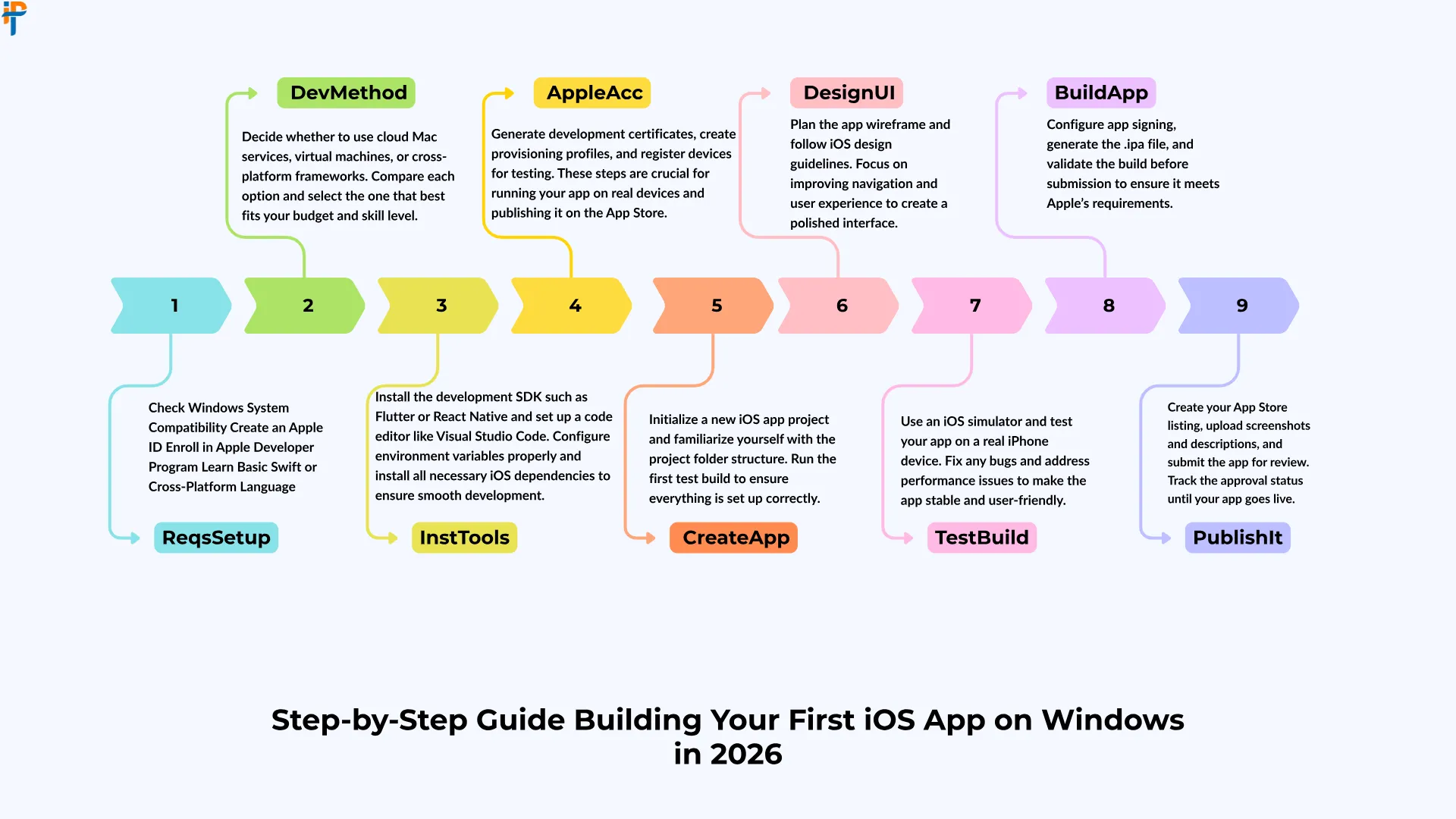

Alright, let’s get practical. Here’s how you can go from zero to a working iOS app using a Windows machine.

Setting Up Your Development Environment

Start by installing the tools you’ll actually need on your Windows PC:

  • Node.js — Required for React Native and many JavaScript-based tools.
  • Flutter SDK — Download from the official Flutter website and add it to your system PATH.
  • Android Studio — Yes, even for iOS development. It provides an excellent emulator and IDE support for Flutter and React Native.
  • VS Code — A lightweight, powerful editor with plugins for Flutter, React Native, and Dart.
  • Remote Desktop Client — For connecting to cloud-based Mac instances when needed.

Once these are installed, you have a solid foundation. Think of it like laying the groundwork before building a house — you wouldn’t skip the foundation, right?

Choosing the Right Framework

Your framework choice will define your entire development journey. Here’s a quick comparison to help you decide:

Framework Language Windows Dev Support iOS Build Support Best For
Flutter Dart Full Requires Mac/Cloud Startups, MVPs
React Native JS/TypeScript Full Requires Mac/Cloud Web devs transitioning
Xamarin/.NET MAUI C# Full Requires Mac/Cloud Enterprise apps
Ionic/Capacitor JS/HTML/CSS Full Requires Mac/Cloud Rapid prototyping
NativeScript JS/TypeScript Partial Requires Mac/Cloud Advanced customization

Each framework has its sweet spot. Flutter wins on UI consistency, React Native wins on community size, and .NET MAUI wins if your team lives in the Microsoft ecosystem. Choose based on your team’s existing skills and your app’s specific requirements.

Testing and Debugging Your App

Testing is where Windows developers feel the pinch the most. Here are your practical options. First, connect a physical iPhone or iPad via USB and use commands like flutter run to deploy your app directly to the device. Second, use cloud-based device testing platforms that let you run your app on hundreds of real iOS devices remotely. Third, use web-based iOS simulators for basic UI checks without needing any hardware at all.

Using BrowserStack and Other Remote Tools

Cloud testing platforms have become lifesavers for Windows-based iOS developers. You upload your compiled app — built via cloud Mac — and test it on real devices, checking UI behavior, performance, gestures, and more. It’s like having an entire device testing lab in your pocket without the capital expense of owning dozens of phones. Pair this with good logging and crash reporting tools, and your testing workflow becomes surprisingly robust.

Also read- AI Chatbots & Virtual Assistants Boost Conversions 2026

Pros of Developing iOS Apps on Windows

Let’s talk about the bright side — because there are genuine advantages to this approach that often get overlooked in the Mac-versus-Windows debate.

Cost Savings — A capable Windows development machine can be significantly cheaper than a comparable Mac. This matters enormously for startups and small teams where every dollar counts.

Familiar Environment — If you’ve spent years on Windows, staying in that ecosystem means less cognitive friction and higher day-to-day productivity. Learning a new OS while learning a new framework is a recipe for frustration.

Cross-Platform Synergy — Tools like Flutter and React Native naturally push you toward writing code that works on multiple platforms simultaneously, which is a massive business advantage in today’s competitive market.

Flexibility — Windows machines offer far more hardware configurability — more RAM options, better GPUs for faster builds, and more storage choices — all at competitive price points.

Larger Developer Community — Windows has the largest developer base globally, meaning more community support, forums, tutorials, and troubleshooting resources at your fingertips.

Cons and Limitations

No sugarcoating here — there are real limitations you need to plan around before committing to a Windows-based iOS development setup.

No Native Xcode — The inability to run Xcode natively is the single biggest limitation. Every workaround adds a layer of complexity to your workflow that simply doesn’t exist on a Mac.

Remote Mac Latency — Cloud-based Mac services can introduce lag, making development feel sluggish during peak usage times. If your internet connection isn’t stellar, this compounds quickly.

Code Signing Complexity — Managing certificates and provisioning profiles without native Xcode access is painful and error-prone, especially for developers new to the Apple ecosystem.

App Store Submission — Final submission to the App Store still benefits greatly from a Mac environment, and automating this process through CI/CD requires additional setup time upfront.

Performance Testing Gaps — Without a real iOS Simulator, performance profiling and memory analysis are harder and less accurate than they would be on a Mac.

Cost Comparison: Windows vs. Mac for iOS Development

Money talks. Let’s break it down honestly so you can make an informed decision:

Expense Category Windows Setup (Annual) Mac Setup (Annual)
Hardware $800–$1,500 (one-time) $1,300–$3,500 (one-time)
Cloud Mac Service $50–$150/month Not needed
Cloud Device Testing $199–$399/month $199–$399/month
IDEs & Plugins Free–$200 Free–$200
CI/CD Platform $50–$100/month $50–$100/month

Interestingly, the cost difference isn’t as dramatic as you might expect over a full year — especially when you factor in cloud Mac subscription costs. However, if your team already owns Windows machines, the incremental cost of adding cloud Mac access is far lower than purchasing an entirely new fleet of MacBooks. For teams of five or more developers, the Windows approach can generate substantial savings over a two-to-three-year hardware lifecycle.

Also read- Deadly Mobile App Development Mistakes Businesses Must Avoid in 2026

Tips to Maximize Productivity on Windows

Working smarter, not harder — here’s how to squeeze every drop of productivity out of your Windows iOS development setup.

Use CI/CD Pipelines Aggressively. Tools like Codemagic, Bitrise, or GitHub Actions with a macOS runner handle your iOS builds automatically in the cloud. You push code from your Windows machine, and the pipeline compiles and distributes the iOS build without you lifting another finger. It’s like having a robot Mac assistant working for you 24/7.

Leverage Hot Reload. Both Flutter and React Native support hot reload, meaning you see changes in real-time on your connected iOS device without fully rebuilding the app. This dramatically cuts your iteration cycle and keeps you in a productive flow state.

Invest in a Physical iOS Device. If you’re serious about iOS development, owning at least one iPhone is non-negotiable. It’s your most reliable testing tool and costs significantly less than a year of cloud testing subscriptions for basic validation work.

Use VS Code Extensions Wisely. Extensions like Flutter, Dart, React Native Tools, and ESLint can transform VS Code into a near-Xcode-level experience for cross-platform development without any of the macOS overhead.

Stay Organized with Git. Version control isn’t optional — it’s essential. Use GitHub or GitLab to maintain clean branches, especially since you’ll be coordinating between local Windows development and cloud-based Mac builds. A messy repository in this kind of hybrid setup is a recipe for painful debugging sessions.

Future of iOS Development Without Mac

Here’s something to get genuinely excited about: the future looks increasingly bright for Windows-based iOS developers. Several powerful trends are converging to make Mac-free iOS development more viable with each passing year.

Apple’s Evolving Developer Tools — There are strong industry signals suggesting that Apple may eventually offer cloud-based development services, reducing dependency on local macOS hardware for at least some parts of the development workflow.

Improved Cross-Platform Frameworks — Flutter and React Native’s latest architecture releases have dramatically improved performance parity with fully native apps, making the cross-platform approach more compelling than it has ever been before.

AI-Assisted Development — AI coding assistants are leveling the playing field in remarkable ways. Complex, platform-specific code that once required deep Apple ecosystem knowledge can now be generated, reviewed, and debugged far more efficiently — regardless of what OS you’re running.

Progressive Web Apps — While not traditional native iOS apps, Progressive Web Apps continue to improve in capability on iOS Safari, offering yet another path for Windows developers to reach iOS users without ever touching Xcode.

The direction is clear: platform lock-in is loosening, developer tooling is becoming more platform-agnostic, and the community is better positioned than ever to build world-class iOS experiences from any operating system they prefer.

Also read- Machine Learning Mobile Apps: Boost User Experience 2026

Conclusion

Developing iOS apps on Windows in 2026 is not just possible — it’s genuinely practical for the right teams with the right approach. Yes, there are workarounds. Yes, there are limitations. But with frameworks like Flutter and React Native, cloud Mac services, robust CI/CD pipelines, and an ever-growing ecosystem of developer tools, Windows developers are no longer second-class citizens in the iOS world.

The key is choosing the right tools, planning your workflow around the constraints, and partnering with experts who know the terrain inside and out. At IPH Technologies, we specialize in exactly this — turning your vision into a polished, App Store-ready iOS application, regardless of your team’s development environment. With 500+ projects successfully delivered and 430+ satisfied clients across the globe, we’ve navigated every challenge described in this article — and then some. Ready to build something incredible? The journey starts with a single conversation.

Frequently Asked Questions (FAQs)

Can I develop iOS apps on Windows without any Mac at all?
Yes, you can write and test the majority of your code on Windows using Flutter or React Native. However, you’ll need access to a Mac environment — either through cloud services or a CI/CD platform — for final iOS builds, code signing, and App Store submissions.
Is Flutter the best framework for iOS development on Windows?
Flutter is widely considered the most Windows-friendly framework for iOS development in 2026, thanks to its excellent tooling, hot reload support, strong community, and consistent UI rendering. React Native is a close second, especially for teams with existing JavaScript expertise.
How much does a cloud Mac service typically cost?
Cloud Mac services generally range from $50 to $150 or more per month depending on the provider, the hardware specs you choose, and your usage volume. MacStadium, MacinCloud, and AWS EC2 Mac instances are among the most popular options available.
Can I submit an app to the Apple App Store from a Windows machine?
The final submission process still requires a macOS environment for code signing and using Apple’s upload tools. However, platforms like Codemagic and Bitrise can fully automate this as part of a cloud-based CI/CD pipeline, so you never have to personally touch a Mac.
Is a Hackintosh a viable option for professional iOS development?
While technically possible, a Hackintosh violates Apple’s licensing agreement and creates significant stability and maintenance challenges — particularly with OS updates. For professional development environments, cloud-based Mac services are a far safer, more reliable, and legally sound alternative.
Do I absolutely need a physical iPhone to develop iOS apps on Windows?
It’s not strictly required, but it is highly recommended. A physical device gives you the most accurate testing environment for real-world performance, gestures, and behavior — and it costs far less annually than most cloud device testing subscriptions for basic validation purposes.
How does code signing work for iOS apps developed on Windows?
Code signing requires Apple Developer certificates and provisioning profiles that are traditionally managed through Xcode on macOS. On Windows, this is typically handled through cloud-based Mac environments or automated CI/CD platforms that run macOS servers in the background and manage signing automatically.
Can IPH Technologies help build an iOS app if my entire team uses Windows?
Absolutely. At IPH Technologies, our development team is fully equipped with the tools, expertise, and infrastructure to deliver high-quality iOS applications regardless of your team’s operating system preference. We handle all Mac-specific build, signing, and deployment processes on your behalf — so you stay focused entirely on your product vision and business goals.
Avatar
Shashi Mishra

Verified CTO

About the Author

I’m Shashi Mishra, CTO at IPH Technologies. I build secure, reliable, future-ready digital products that solve real problems without unnecessary complexity. My work focuses on AI-driven development, cloud-native architecture, and a strict compliance-first approach, ensuring every product meets global security, performance, and regulatory standards. I’ve helped companies modernize systems, integrate AI, and scale platforms with clean engineering and strong user experience. I enjoy working with teams and founders who want to innovate fast while maintaining quality and trust.


WhatsApp
Call us
Get a Call Back