

























































HIPAA SOC 2 GDPR ISO 27001 PDPL ISO 9001
Our Achievements
appfutura
BusinessFirms
DesignRush
GoodFirms
ITFirms
iTRate.co
Mobile App Daily
Tech Behemoths
Highlights
UI/UX Design
User-first, visually engaging interfaces crafted to enhance usability, boost engagement, and deliver seamless digital experiences.
Branding
Strategic brand identities that communicate your vision, build trust, and create a memorable presence across all touchpoints.
Wireframing
Structured layouts and user flows that map the product journey clearly before development begins, saving time and cost.
Prototype Design
Interactive prototypes that simulate real user interactions, helping validate ideas and refine experiences early.
Design Systems
Scalable design frameworks and reusable components that ensure consistency, speed, and efficiency across your product.
UI/UX Design

We design intuitive, user-centric interfaces that enhance engagement, improve usability, and deliver seamless digital experiences across all devices.

UI UX Design
  • User research and wireframing for clear flows
  • Modern UI design using Figma and Adobe XD
  • Interactive prototypes for better user experience testing
  • Usability testing and performance optimization improvements
  • Responsive design across all devices and screens
  • Scalable design systems with reusable UI components
Branding & Identity

We craft strong brand identities that communicate your vision, build trust, and create a lasting impression across all digital and offline touchpoints.

Branding and Identity
  • Logo design and brand identity creation
  • Brand guidelines and visual consistency systems
  • Color palette and typography selection strategy
  • Marketing materials and brand asset design
  • Social media branding and creative direction
  • Rebranding and brand positioning strategies
Wireframing

We create structured wireframes that define layout, user flow, and functionality, helping visualize ideas and build a strong foundation before design and development.

Wireframing
  • Low fidelity wireframes for initial structure
  • High fidelity wireframes with detailed layouts
  • User flow mapping for better navigation
  • Content hierarchy and layout planning
  • Clickable wireframes for early feedback
  • Clear structure before UI design phase
Prototype Design

We design interactive prototypes that simulate real user experiences, helping validate ideas, test functionality, and refine products before development.

Prototype Design
  • Interactive prototypes for real user experience
  • Clickable designs to test product functionality
  • User journey simulation for better understanding
  • Rapid prototyping for faster design validation
  • Feedback driven improvements before development
  • High fidelity prototypes with smooth interactions
Design Systems

We build scalable design systems that ensure consistency, improve collaboration, and accelerate product development across all platforms and teams.

Design Systems
  • Reusable UI components for consistent design
  • Design tokens for colors typography spacing
  • Component libraries for faster development workflow
  • Consistent branding across all digital products
  • Documentation for design and development teams
  • Scalable systems for growing product ecosystems
Highlights
Mobile Apps Development
High-performance Android and iOS mobile applications built with modern technologies, delivering seamless user experiences and robust functionality.
Desktop Application Dev
Powerful and secure desktop applications tailored for Windows, macOS, and Linux, designed for performance, scalability, and reliability.
Web App Development
Scalable and responsive web applications using modern frameworks like React, Angular, and Vue for fast, dynamic, and engaging experiences.
Cross-Platform
Cost-effective cross-platform solutions using Flutter and React Native, enabling a single codebase for both iOS and Android platforms.
PWA Development
Progressive Web Apps that combine the best of web and mobile, offering offline access, fast loading, and app-like experiences directly in the browser.
Highlights
Mobile App

Android

iOS

Flutter

Hybrid

Optimize

Native

Swift

Firebase

Android App Development

We craft powerful, scalable Android applications with intuitive UX, high performance, and deep integration with Google services.

Android App
  • Custom Android app development
  • Native Kotlin & Java apps
  • Google Play Store deployment
  • Material Design UI implementation
Kotlin

Kotlin

Java

Java

Flutter

Flutter

Android Studio

Android

Jetpack

Jetpack

iOS App Development

We build high-quality, user-centric iOS apps combining performance, security, and seamless design for Apple devices.

iOS App
  • Custom iOS app development
  • Native Swift & SwiftUI apps
  • Seamless Apple service integration
  • App Store review & deployment
Swift

Swift

SwiftUI

SwiftUI

Obj-C

Obj-C

Xcode

Xcode

Flutter

Flutter

Cross-Platform Apps

We develop cross-platform mobile apps that run flawlessly on both iOS and Android from a single codebase, saving time and cost.

Cross-Platform App
  • Single codebase for iOS & Android
  • Flutter & React Native development
  • Native-like performance & UI
  • Faster time-to-market
React Native

React Native

TypeScript

TypeScript

Redux

Redux

Firebase

Firebase

Dart

Dart

Hybrid Apps

We build hybrid mobile apps that blend web technologies with native capabilities, delivering broad reach and cost-effective development.

Hybrid App
  • Web + native feature integration
  • Ionic & Cordova frameworks
  • Reduced development costs
  • Multi-platform publishing
Flutter

Flutter

Dart

Dart

Firebase

Firebase

SQLite

SQLite

App Optimization

We enhance existing mobile apps with performance tuning, crash fixes, battery efficiency, and faster load times for a superior user experience.

App Optimization
  • Performance profiling & tuning
  • Memory & battery optimization
  • Crash analysis & bug fixing
  • App size reduction & load speed
Xcode

Xcode

Android Studio

Android

Firebase

Firebase

Java

Java

Highlights
Desktop App

Windows

macOS

Linux

Desktop

Electron

Qt

WinForms

GTK

Windows Apps

We develop robust Windows desktop applications using modern Microsoft technologies, delivering powerful tools for enterprise and consumer use.

Windows App
  • Custom Windows desktop applications
  • WPF & WinForms development
  • Microsoft Store deployment
  • Windows API & system integration
C#

C#

.NET

.NET

Electron

Electron

Visual Studio

Visual Studio

SQL Server

SQL Server

macOS Apps

We create elegant, high-performance macOS applications that leverage Apple's native frameworks for a smooth and delightful desktop experience.

macOS App
  • Native macOS app development
  • SwiftUI & AppKit integration
  • Mac App Store submission
  • Apple Silicon optimization
Swift

Swift

SwiftUI

SwiftUI

Obj-C

Obj-C

Xcode

Xcode

Cross-Platform Desktop

We develop cross-platform desktop applications that run seamlessly on Windows, macOS, and Linux from a single shared codebase.

Cross-Platform Desktop
  • Single codebase for all platforms
  • Electron & Tauri frameworks
  • Flutter for desktop support
  • Consistent UI across OS environments
Flutter

Flutter

Electron

Electron

Node.js

Node.js

TypeScript

TypeScript

Docker

Docker

Electron Apps

We build feature-rich Electron desktop apps using web technologies, enabling cross-platform deployment with native OS capabilities.

Electron App
  • Electron framework development
  • Node.js & Chromium integration
  • Auto-updater & native notifications
  • Cross-OS packaging & distribution
Electron

Electron

Node.js

Node.js

React

React

Vue

Vue

TypeScript

TypeScript

Highlights
Web App

React

Node.js

PHP

Laravel

Python

MySQL

JavaScript

HTML

CSS

React Development

We build fast, component-driven React web applications with modern state management, reusable UI, and seamless API integration.

React Development
  • Custom React SPA development
  • Redux & Context API state management
  • Next.js SSR & SSG support
  • REST & GraphQL API integration
React

React

Next.js

Next.js

Redux

Redux

TypeScript

TypeScript

Tailwind

Tailwind

Angular Development

We develop enterprise-grade Angular applications with structured architecture, two-way data binding, and robust TypeScript foundations.

Angular Development
  • Custom Angular SPA development
  • RxJS & NgRx state management
  • Angular Material UI components
  • Lazy loading & performance tuning
Angular

Angular

TypeScript

TypeScript

HTML

HTML

CSS

CSS

NPM

NPM

Node.js Backend

We build scalable, event-driven Node.js backends with RESTful APIs, real-time capabilities, and seamless database integrations.

Node.js Backend
  • RESTful & GraphQL API development
  • Express.js & Fastify frameworks
  • WebSocket & real-time features
  • MongoDB, PostgreSQL integration
Node.js

Node.js

Express

Express

MongoDB

MongoDB

GraphQL

GraphQL

Docker

Docker

Cloud Web Apps

We design and deploy cloud-native web applications on AWS, Azure, and GCP — scalable, secure, and built for high availability.

Cloud Web Apps
  • AWS, Azure & GCP deployment
  • Serverless architecture development
  • Auto-scaling & load balancing
  • CI/CD pipeline configuration
AWS

AWS

Azure

Azure

GCP

GCP

Docker

Docker

Kubernetes

Kubernetes

Full-Stack Dev

We deliver complete full-stack web solutions — from pixel-perfect frontends to robust backends — as a unified, end-to-end product.

Full-Stack Dev
  • Frontend & backend development
  • MERN & MEAN stack expertise
  • Database design & API architecture
  • DevOps, hosting & deployment
React

React

Node.js

Node.js

MongoDB

MongoDB

PostgreSQL

PostgreSQL

Docker

Docker

Highlights
Cross Platform

Flutter

R. Native

Xamarin

Ionic

Reuse

Electron

NW.js

Framework7

SwiftUI

Flutter Development

We build beautiful, natively compiled Flutter applications for mobile, web, and desktop from a single Dart codebase with pixel-perfect UI.

Flutter Development
  • Flutter mobile & web apps
  • Dart language development
  • Custom widget & animation creation
  • Firebase & REST API integration
Flutter

Flutter

Dart

Dart

Firebase

Firebase

GetX

GetX

Riverpod

Riverpod

React Native

We develop high-performance React Native apps that deliver a truly native experience on both iOS and Android using JavaScript and React.

React Native
  • Cross-platform iOS & Android apps
  • React Native CLI & Expo development
  • Native module & bridge integration
  • Redux & MobX state management
React Native

React Native

Redux

Redux

TypeScript

TypeScript

Firebase

Firebase

Xamarin

We develop Xamarin-based cross-platform apps using C# and .NET, enabling shared business logic across iOS, Android, and Windows.

Xamarin
  • Xamarin.Forms & MAUI apps
  • Shared C# codebase development
  • Native API access via bindings
  • Enterprise app integration
Xamarin

Xamarin

C#

C#

.NET MAUI

.NET

Azure

Azure

Visual Studio

Visual Studio

Ionic Framework

We create stunning Ionic applications that combine the power of web technologies with native device features for a seamless mobile experience.

Ionic Framework
  • Ionic Angular & React apps
  • Capacitor native plugin integration
  • Responsive mobile-first UI
  • PWA & hybrid app deployment
Ionic

Ionic

Angular

Angular

React

React

Vue

Vue

Code Reusability

We build reusable app architectures, reducing duplication, accelerating development, and ensuring seamless cross-platform consistency.

Code Reusability
  • Shared component library creation
  • Monorepo architecture setup
  • Design system implementation
  • Platform-agnostic business logic
Turborepo

Turborepo

Storybook

Storybook

Flutter

Flutter

React Native

React Native

Highlights
PWA

PWA

Offline

Push

Fast

App-Like

IndexedDB

Installable

Sync

Progressive Web Apps

We build Progressive Web Apps that combine the best of web and mobile — installable, reliable, and fast across all devices and browsers.

Progressive Web Apps
  • PWA architecture & manifest setup
  • Service worker implementation
  • Installable & home screen support
  • Cross-browser compatibility
HTML5

HTML5

CSS3

CSS3

JavaScript

JavaScript

Workbox

Workbox

Lighthouse

Lighthouse

Offline Support

We implement robust offline capabilities in your web apps using service workers and smart caching so users stay productive without connectivity.

Offline Support
  • Service worker caching strategies
  • IndexedDB offline data storage
  • Background sync implementation
  • Graceful offline fallback pages
Service Worker

ServiceWorker

Workbox

Workbox

IndexedDB

IndexedDB

Cache API

Cache API

Background Sync

BackgroundSync

Push Notifications

We integrate web push notification systems into your PWA to re-engage users with timely, personalized alerts even when the app is not open.

Push Notifications
  • Web Push API implementation
  • VAPID key & subscription management
  • Notification scheduling & targeting
  • Cross-browser push support
Web Push

Web Push

Firebase FCM

Firebase

OneSignal

OneSignal

Node.js

Node.js

Workbox

Workbox

Fast Loading

We optimize PWAs for lightning-fast load times using code splitting, lazy loading, and caching to deliver exceptional Core Web Vitals scores.

Fast Loading
  • Code splitting & lazy loading
  • Image & asset optimization
  • Core Web Vitals improvement
  • CDN & caching configuration
Webpack

Webpack

Lighthouse

Lighthouse

Vite

Vite

Cloudflare

Cloudflare

Workbox

Workbox

App-Like Experience

We craft PWAs that feel and behave like native mobile apps — with smooth animations, full-screen mode, gestures, and seamless transitions.

App-Like Experience
  • Full-screen & standalone display mode
  • Touch gestures & swipe navigation
  • Smooth page transitions & animations
  • App shell architecture
Web Manifest

Web Manifest

CSS Animations

CSS

Framer Motion

FramerMotion

React

React

Vue

Vue

Highlights
Custom Software
Fully tailored software solutions designed to match your unique business processes, improving efficiency and driving long-term growth.
Backend Systems
Robust and secure backend architectures built for high performance, scalability, and seamless integration with your applications.
Database Design
Efficient and scalable database structures optimized for fast queries, data integrity, and reliable performance at scale.
Cloud-Native
Modern cloud-native solutions using microservices and serverless architecture on AWS, Azure, and GCP for maximum flexibility and scalability.
API Development
Secure and well-documented RESTful and GraphQL APIs that enable seamless communication between systems and third-party integrations.
Custom Software

We develop tailored software solutions that align with your business goals, streamline operations, and deliver scalable, high-performance digital systems.

Custom Software Development
  • Custom software tailored to business needs
  • Scalable architecture for long term growth
  • Secure and high performance application development
  • API integration with third party services
  • Cloud based and enterprise software solutions
  • Ongoing maintenance and system optimization support
Backend Systems

We build robust backend systems that power applications with secure, scalable architecture, efficient data handling, and seamless integrations.

Backend Systems
  • Secure backend architecture and system design
  • Database design and performance optimization
  • API development for seamless integrations
  • Authentication and authorization system implementation
  • Server side logic and business workflows
  • Scalable infrastructure for high traffic applications
Database Design

We design efficient database structures that ensure data integrity, optimize performance, and support scalable, reliable application systems.

Database Design
  • Structured database schema design and planning
  • Efficient data modeling for scalable systems
  • Database optimization for faster query performance
  • Relational and non relational database solutions
  • Secure data storage and access management
  • Backup strategies and data recovery solutions
Cloud-Native Apps

We build cloud-native applications designed for scalability, resilience, and flexibility using modern cloud infrastructure and microservices architecture.

Cloud Native Apps
  • Cloud first architecture for scalable applications
  • Microservices based system design and deployment
  • Containerization using Docker and Kubernetes tools
  • Auto scaling infrastructure for high availability
  • Continuous integration and continuous deployment pipelines
  • Secure cloud environments with monitoring and logging
API Development

We develop secure and scalable APIs that enable seamless communication between systems, applications, and third party services.

API Development
  • RESTful API development for web applications
  • Secure API authentication and authorization systems
  • Third party API integration and data exchange
  • Scalable APIs for high traffic applications
  • API documentation for easy developer integration
  • Performance optimization and API response tuning
Highlights
Manual Testing
Detailed human-driven testing to uncover edge cases, validate user flows, and ensure a seamless, intuitive user experience.
Test Automation
Automated testing frameworks using Selenium, Cypress, and Appium to accelerate regression cycles and improve release confidence.
Performance
Load, stress, and scalability testing to ensure your application performs reliably under high traffic and demanding conditions.
Security Testing
Comprehensive security assessments including penetration testing and vulnerability analysis to safeguard your application.
Mobile QA
End-to-end mobile application testing across devices and platforms to ensure consistent performance, usability, and stability.
Manual Testing

We perform detailed manual testing to ensure software quality, identify issues early, and deliver reliable, user-friendly applications.

Manual Testing
  • Functional testing for application core features
  • UI testing for consistent user experience
  • Cross browser and device compatibility testing
  • Test case creation and execution processes
  • Bug tracking and detailed issue reporting
  • Regression testing after feature updates
Test Automation

We implement automated testing solutions to improve efficiency, reduce manual effort, and ensure faster, reliable software delivery.

Test Automation
  • Automated test scripts for faster execution
  • Regression testing using automation frameworks
  • Continuous testing within CI CD pipelines
  • Test coverage improvement across application modules
  • Reusable automation scripts for long term scalability
  • Performance and load testing automation solutions
Performance Testing

We evaluate application performance to ensure speed, stability, and scalability under different workloads and real-world conditions.

Performance Testing
  • Load testing for high traffic scenarios
  • Stress testing to identify system limits
  • Performance benchmarking and response time analysis
  • Scalability testing for growing user demands
  • Memory and resource usage optimization checks
  • Bottleneck identification and performance improvements
Security Testing

We identify vulnerabilities and secure applications against threats, ensuring data protection, compliance, and safe user interactions.

Security Testing
  • Vulnerability assessment and risk analysis testing
  • Penetration testing to identify security gaps
  • Authentication and authorization security validation
  • Data protection and encryption testing processes
  • Secure code review and security best practices
  • Compliance testing with industry security standards
Mobile QA

We ensure mobile applications deliver flawless performance, usability, and compatibility across devices, platforms, and environments.

Mobile QA
  • Mobile app testing across multiple devices
  • iOS and Android platform compatibility testing
  • UI testing for consistent mobile experience
  • Network and performance testing on mobile
  • App usability and user experience validation
  • App store readiness and release testing
Highlights
CI/CD Pipelines
Automated pipelines for building, testing, and deploying code, enabling faster releases, fewer errors, and continuous delivery.
Infrastructure
Scalable infrastructure provisioning using Infrastructure as Code (IaC) with Terraform and CloudFormation for consistency and reliability.
Deployment
Zero-downtime deployment strategies including blue-green and rolling deployments to ensure smooth and reliable releases.
Containerisation
Container-based architectures using Docker and Kubernetes for portability, scalability, and efficient resource utilization.
Monitoring
Real-time monitoring and observability using tools like Grafana, Prometheus, and Datadog to ensure system health and performance.
CI/CD Pipelines

We implement CI/CD pipelines to automate build, testing, and deployment, enabling faster releases, improved quality, and continuous delivery.

CI CD Pipelines
  • Automated build and deployment pipeline setup
  • Continuous integration for faster code validation
  • Continuous delivery for seamless release cycles
  • Integration with Git version control systems
  • Automated testing within CI CD workflows
  • Monitoring and rollback strategies for deployments
Infrastructure

We design and manage reliable infrastructure to ensure scalability, security, and high availability for modern applications and systems.

Infrastructure
  • Cloud infrastructure setup and configuration services
  • Server management and deployment automation solutions
  • High availability and load balancing implementation
  • Monitoring and logging for system performance tracking
  • Security hardening and infrastructure access controls
  • Scalable environments for growing application demands
Deployment

We manage seamless deployment processes to ensure applications are delivered efficiently, securely, and ready for production environments.

Deployment
  • Application deployment to cloud and servers
  • Automated deployment workflows for faster releases
  • Environment configuration and setup management
  • Version control and release management processes
  • Rollback strategies for safe deployment updates
  • Post deployment monitoring and performance checks
Containerization

We use containerization to package applications for consistency, scalability, and efficient deployment across different environments.

Containerization
  • Application containerization using Docker technologies
  • Environment consistency across development and production
  • Container orchestration with Kubernetes platforms
  • Scalable container deployment for microservices architecture
  • Efficient resource utilization and system isolation
  • Integration with CI CD pipelines for automation
Monitoring

We monitor systems and applications in real time to ensure performance, reliability, and quick issue detection and resolution.

Monitoring
  • Real time system performance monitoring tools
  • Application health checks and uptime tracking
  • Error tracking and issue alerting systems
  • Log management and analysis for debugging
  • Resource usage monitoring across infrastructure layers
  • Proactive issue detection and incident response
Highlights
Roadmap Planning
Strategic product roadmaps aligned with business goals, helping prioritize features, manage timelines, and deliver maximum value.
Team Coordination
Efficient coordination across design, development, and QA teams to ensure smooth collaboration and on-time project delivery.
Growth Strategy
Data-driven product strategies focused on user acquisition, retention, and continuous improvement to drive sustainable growth.
Agile Sprints
Agile methodologies like Scrum and Kanban to deliver iterative releases, improve flexibility, and maintain predictable progress.
Stakeholder Mgmt
Clear communication and alignment with stakeholders through regular updates, reporting, and feedback loops to ensure project success.
Roadmap Planning

We create strategic roadmaps that align with your business goals, helping prioritize features, plan execution, and ensure long-term success.

Roadmap Planning
  • Product roadmap planning aligned with business objectives
  • Feature prioritization based on user and market needs
  • Timeline planning for efficient project execution phases
  • Technology stack selection for scalable solutions
  • Risk assessment and mitigation strategy planning
  • Continuous roadmap updates based on performance insights
Team Coordination

We ensure smooth collaboration across teams to improve productivity, streamline workflows, and deliver projects efficiently on time.

Team Coordination
  • Cross functional team collaboration and communication
  • Agile workflow management and sprint planning processes
  • Task tracking and project progress visibility tools
  • Clear role assignment and responsibility management
  • Regular updates and performance review meetings
  • Efficient coordination between design development teams
Growth Strategy

We develop data-driven growth strategies to scale your business, increase user acquisition, and maximize long-term revenue potential.

Growth Strategy
  • Market analysis and competitive growth planning strategies
  • User acquisition and retention optimization techniques
  • Data driven decision making and performance insights
  • Scalable business models for long term expansion
  • Conversion rate optimization across digital platforms
  • Continuous growth tracking and strategy refinement
Agile Sprints

We follow agile sprint methodologies to deliver faster iterations, improve collaboration, and ensure continuous product improvement.

Agile Sprints
  • Sprint planning and backlog prioritization processes
  • Daily standups for team alignment and progress tracking
  • Iterative development with continuous feedback cycles
  • Task management using agile tools and workflows
  • Regular sprint reviews and performance retrospectives
  • Faster delivery with incremental feature releases
Stakeholder Management

We ensure clear communication and alignment with stakeholders to drive project success, transparency, and informed decision making.

Stakeholder Management
  • Regular stakeholder communication and reporting processes
  • Requirement alignment with business goals and expectations
  • Feedback collection and continuous improvement strategies
  • Transparent project updates and progress visibility
  • Risk identification and stakeholder expectation management
  • Collaborative decision making for project success

How to Build an AI Enabled Invoice Management App in 2026: The Step-by-Step Guide

Invoice management app development refers to the creation of a system that handles the generation, sending, tracking, and reconciliation of bills. The application usually involves managing the tax logic, payment gateway interaction, reminders, and other features to ensure cash flow visibility. In most cases, building a minimal viable product (MVP) takes between eight and twelve weeks and costs between $15,000 and $60,000. At the same time, a full-scale platform with advanced features such as multi-user management and reporting dashboards takes longer and is more expensive depending on the complexity level. This is a short guide about invoicing applications, and everything below is what determines if the solution will be used beyond the second month.

I have observed many startups that have failed to launch successful invoicing apps. During consultations, each founder focuses on how their invoice builder screen will look, what customization options they will offer, and what kind of logo they want to see on the interface. By contrast, not enough attention is paid to features that directly impact the user’s experience and an app’s capacity to retain customers for years. The invoicing screen is usually the simplest part of an application to build. At the same time, its functionality is rarely compelling enough to motivate users to stay with the product. Instead, critical features that should be perfected to the level of the best invoicing apps include automation of reminders, convenient payment processing, and reconciliation dashboards.

This guide will discuss the critical functions of an invoice management app, how to build them, cost implications, and the most common project mistakes.

What an Invoice Management App Actually Has to Do
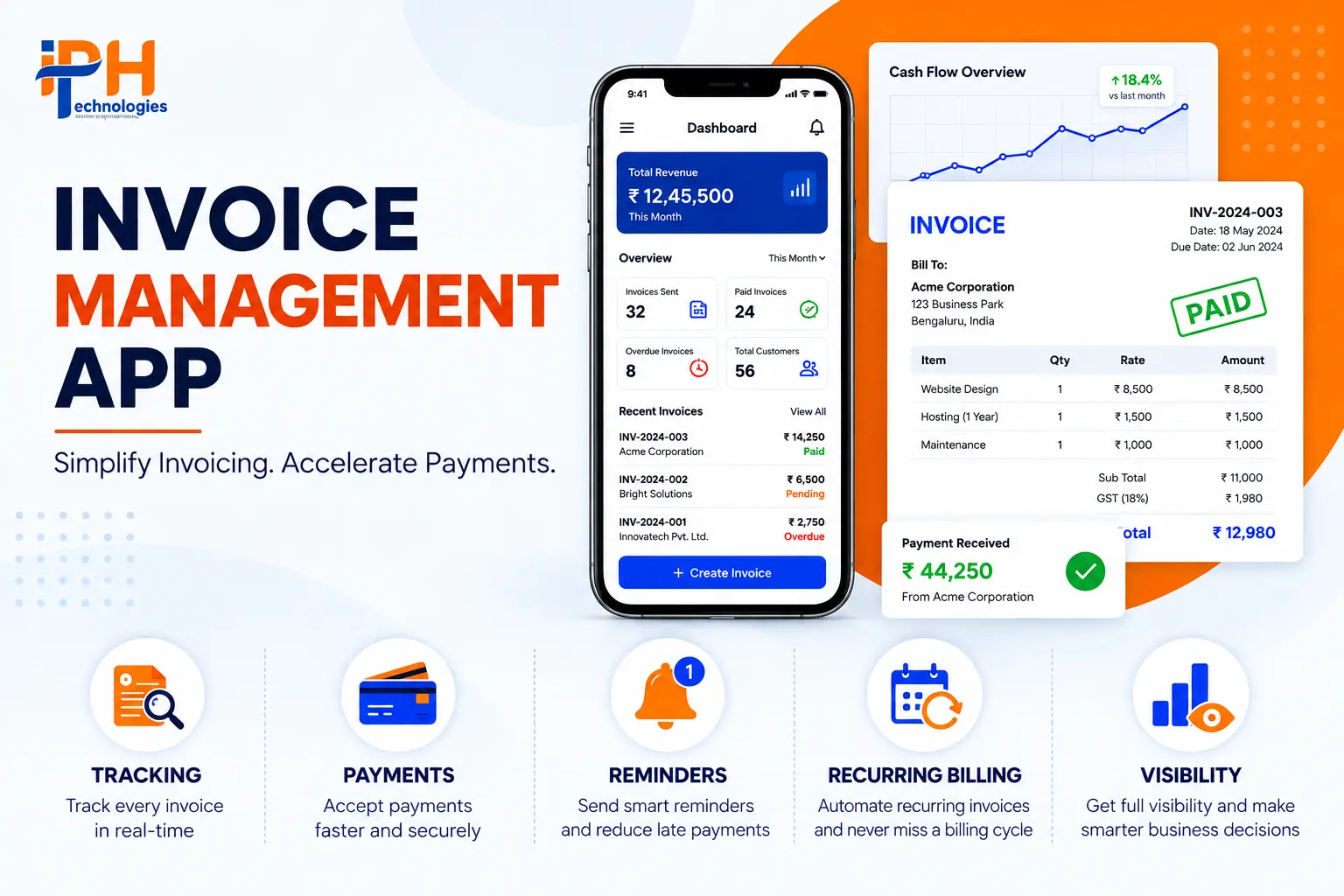
An invoicing app is not just a tool for generating PDFs, but a financial system in its own right that exists between you, your customer, and your bank, which means it has to be reliable, auditable and quick or you’ll have problems.

At minimum, the system needs to:

  • Generate professional, branded invoices with line items, taxes, and discounts
  • Track invoice status across the full lifecycle — draft, sent, viewed, paid, overdue
  • Accept payments directly through integrated gateways
  • Send automated reminders before and after due dates
  • Support recurring billing for retainer or subscription clients
  • Give the business owner a real-time view of cash flow and outstanding balances

If you skip the reminder engine and the status tracking, you’re not building a lighter version of an invoicing app. You’re building a digital filing cabinet. One that still needs someone to chase payments by hand.

Core Feature Set: What Belongs in Version One

Every credible invoicing platform converges on roughly the same modules. Here’s what they do and why the order you build them in matters more than the list itself.

ModuleWhat It DoesWhy It’s Non-Negotiable
Invoice Creation EngineLine items, tax calculation, discounts, custom branding, PDF generationThis is the product’s front door; a clunky builder gets abandoned before the app proves any value
Client & Contact DatabaseStores client details, billing history, and contact info, linked to every invoiceWithout this, every invoice is a one-off document instead of part of a relationship you can analyze
Payment Gateway IntegrationAccepts cards, bank transfers, UPI, wallets, or international payments directly from the invoiceThe single biggest lever on how fast you actually get paid
Status Tracking & RemindersFlags sent, viewed, paid, and overdue invoices; triggers automated follow-upsThe feature that turns the app from a record-keeper into a collections tool
Recurring BillingAuto-generates and sends invoices on a schedule for retainer or subscription clientsSaves the most repetitive manual work once it’s running
Reporting & Analytics DashboardRevenue trends, outstanding balances, aging reports, client payment historyWhere the business owner actually makes decisions
Multi-User & Role-Based AccessLets accountants, sales staff, or team members work in the same system with defined permissionsBecomes essential the moment more than one person touches billing
Tax & Compliance LayerGST/VAT-ready calculations and reportingNon-negotiable the moment you sell across more than one jurisdiction

Most guides concerning building such a system, be it no-code builder tutorials or competitors’ documentation, overlook the essential aspect – the order of development. To begin with, you should design the engine for creating the invoices and the client database. These two modules are the foundation for the rest of the software since all the other features will require either billing information or client data. The payment gateway and status tracking system come next – in most cases, they are useless without an invoice, so you should design them right after you design the invoices. Recurring payments, multi-user access system, and analytics dashboards can be added later in the development cycle if you utilize the right data models; otherwise, these features will have to wait until you rework your entire backend.

Step-by-Step: How to Actually Build the App
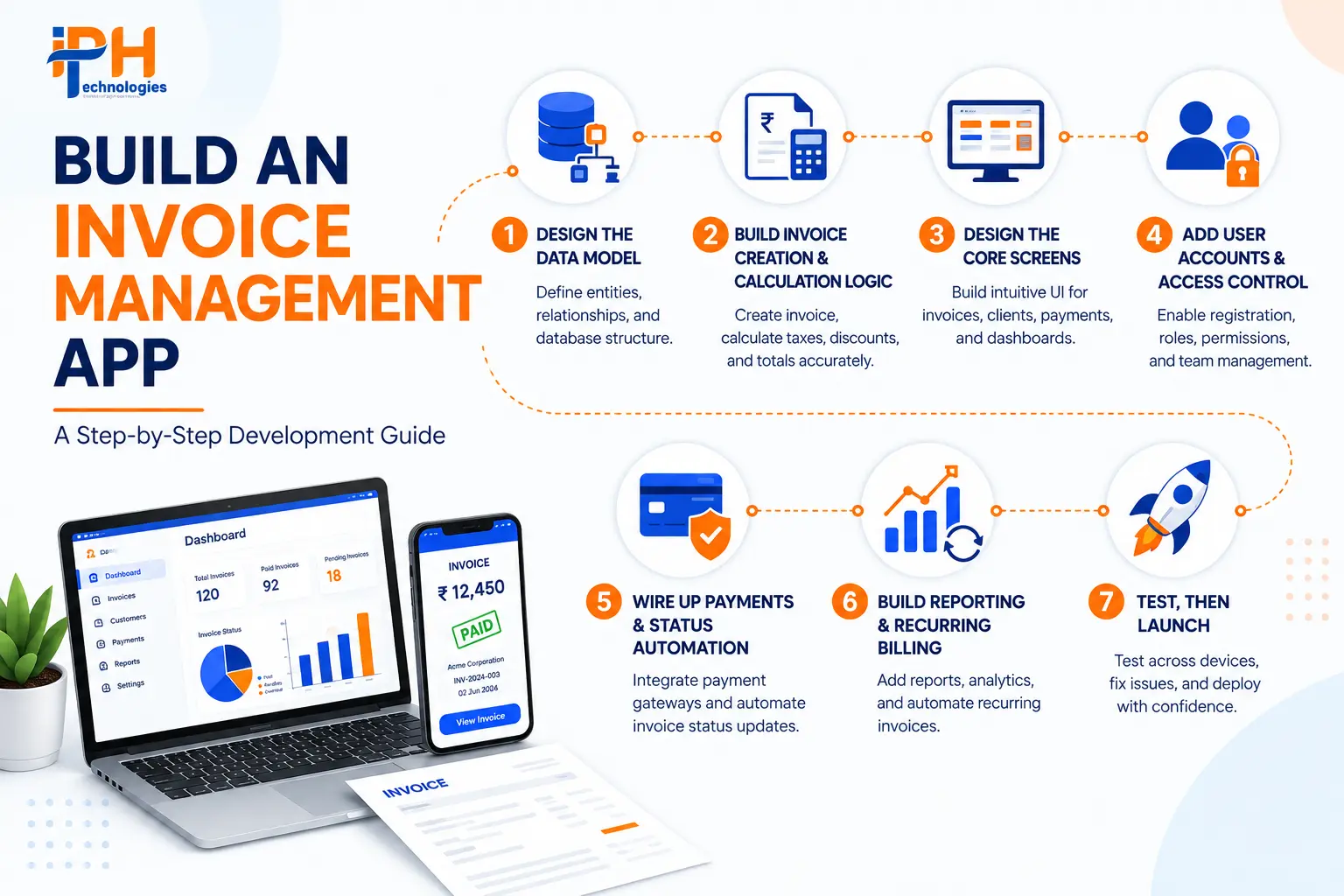
Step 1: Design the Data Model First

Before diving into screen designing, identify the two main entities for the app that need to be created first. These are Invoices and Clients, with the latter having one to many relationships with the former. Additionally, make sure Invoices have a many to one relationship with Line Items. Let the end-users manage their own list of clients. Also, remember that invoices usually include products/services, quantity, rate, and amount per item, which means that you need to create a separate database table for Line Item details. Make sure to store amounts as numbers with decimals rather than strings to make calculations of taxes and totals more efficient and accurate. Remember that all the other elements will be developed on this foundation, so spend enough time to design it properly.

Step 2: Build the Invoice Creation and Calculation Logic

Create formulas that define line item totals (quantity × the rate), subtotals (the sum of all line item totals), tax (some percentage defined separately of the subtotal), and the overall total. Ensure that numbers are rounded to two decimal places at all times, to represent fractions of a currency unit, and formatted consistently in terms of thousands separators and the currency symbol. This is also where you should plan your tax strategy for the application: while a single tax rate is simple and good enough for a minimum viable product, consider designing the system so that taxes are calculated differently depending on the location of the buyer (and therefore subject to different local laws) to avoid having to rewrite this logic later.

Step 3: Design the Core Screens

At minimum, you need a dashboard with summary cards (outstanding balance, overdue count, revenue this month), client list, invoice list with status filtering, invoice detail view, and “create invoice” process. Your design should be mobile-first because odds are someone is going to open that invoice on their phone. The person creating the invoice may be sitting in an office, but the person paying it is likely on their phone.

Step 4: Add User Accounts and Access Control

The most obvious requirement for any invoicing application is the authentication system. The more interesting challenge is figuring out who can see what: who has access to which invoice. For apps designed for teams, it is essential to design role-based permissions. If the target audience will include clients you need to let log on to the app, make sure to set up filters so that each user will only be able to see their invoices. This is a critical feature to design if you have multiple companies using the same software, and it is surprisingly easy to mishandle during development.

Step 5: Wire Up Payments and Status Automation

Integrate a payment gateway (Stripe, Razorpay, or another regional alternative) so that customers can pay directly from the invoice, eliminating the extra step of switching to a separate payment interface. Set up an automatic webhook or action to update the payment status to Paid in the invoice upon successful payment, as the ability to manually edit statuses is what enables the invisible reconciliation loopholes that erode trust in the system.

Step 6: Build Reporting and Recurring Billing

Add an aging report (how much time is past due for each invoice), revenue trend view, and client payment history. For clients on a retainer or subscription, add a recurring invoice scheduler that can automatically generate and send out invoices on a regular schedule so no one has to remember to do it manually.

Step 7: Test, Then Launch

Run through the entire purchase flow using test data: create, send, view, pay, mark overdue. Desktop and mobile versions are both tested. Payment system transactions are simulated in sandbox mode, and only after testing and switching to production keys, the product is ready to be published on the web and, if applicable, in app stores.

Cloud vs. On-Premise: The Decision Most Founders Skip Past

Almost any invoicing application as we think of it today has to be cloud-based these days – built with NodeJS, React or their counterparts on the frontend and backend, deployed on AWS, Azure, or GCP, and using a managed PostgreSQL or MongoDB database. Cloud-hosting provides the invoicing app with the key capability of being accessible from multiple devices seamlessly, which is critical for the product as it enables the client to view the invoice from their mobile phones while the business owner works on a laptop. The invoicing app’s hosting on-premise would make sense only for the most particular data jurisdiction cases or when the organization already has the infrastructure in place that the application must adhere to, which is far from being the common use case. It would also limit the ability to implement additional features, such as using A.I. to suggest the best time to send out a certain invoice and identify outliers in the payment process.

What This Actually Costs

Build TypeScopeTypical RangeTypical Timeline
No-Code MVPBasic invoice creation, client list, payment link, manual status tracking$0 – $15,000 (platform subscription + setup)1 – 3 weeks
Custom MVPFull invoice + client database, payment gateway, automated reminders, single platform$15,000 – $60,0008 – 12 weeks
Mid-Complexity PlatformMulti-user access, recurring billing, analytics dashboard, accounting software integration, web + mobile$60,000 – $150,0003 – 5 months
Enterprise / Multi-JurisdictionMulti-currency, advanced tax compliance, ERP/CRM integration, AI-assisted collections, role-based governance$150,000 – $300,000+5 – 9 months

No-code builders can truly enable a freelancer or a solo-founder business to get to a functional invoicing prototype in days as opposed to months, and that can be a good solution if their needs are simple. The same tools that let you build an MVP quickly, however, will quickly reach their limits when it comes to implementing even moderately complex tax logic, accounting software relations, and permission systems. If any of these are on the roadmap, it’s better to budget the cost of development upfront rather than attempt to migrate away from a no-code solution later.

Things that will differentiate an emerging player from the competitors ahead and catalyze its growth beyond the founding team’s expectations: integration with upstream accounting software (QuickBooks, Tally, Xero, Zoho), multi-currency and multi-tax jurisdiction support, and role-based access controls that scale to accommodate larger workgroups.

Why Invoicing Apps Actually Lose Users
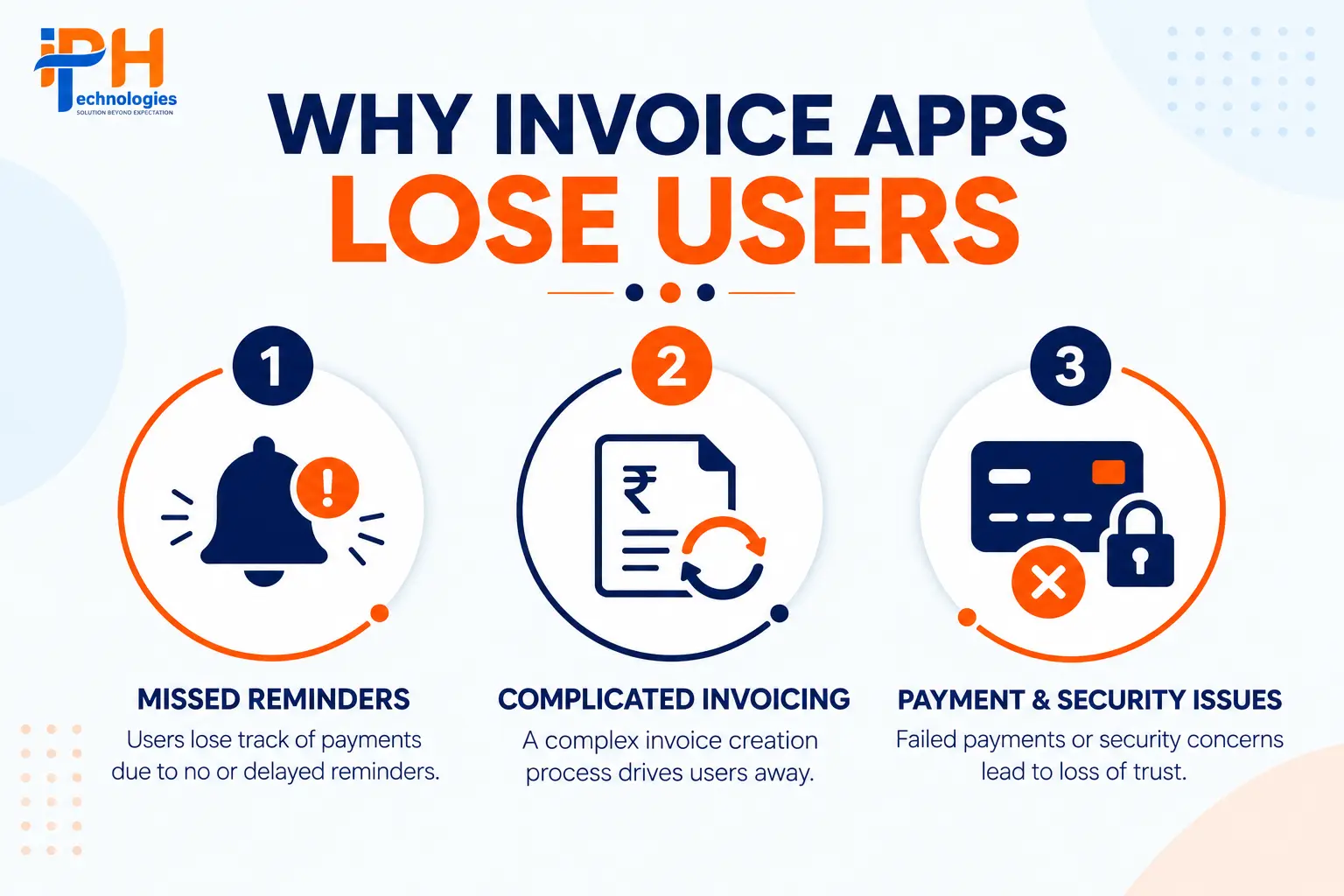
Three patterns explain most of the churn in this category, and none of them are about the visual design.
Reminder fatigue or reminder failure. Automated reminders are the single best lever in the whole app, period. The most common mistake is to make them either too aggressive (and alienate customers), or too lax (and then the app fails to do its primary job of getting people paid on time, while giving them the false sense of security that everything is under control).

Status drift. If, for example, a customer makes a payment in a channel not controlled by the application, for instance, by transferring funds from another bank account or by manually entering the details in an invoice that has already been sent out, but it still appears as ‘pending’ in the application, there is no other option but to start checking every single detail manually. The application’s accuracy is compromised, and, once a business owner notices such a discrepancy, it makes the tool practically useless.

Friction at the point of payment. Any additional steps you force the client to make between seeing their invoice and paying you slow down collections. A link to pay right on the invoice is always better than an option to log in somewhere else to make a payment.

The practical implication: retention isn’t a marketing line of business, it’s a design imperative. You can’t just bolt on a separate set of resources to handle it; it has to be engineered into the product with the same care as any other feature. A large chunk of the engineering investment goes into the machinery which powers reminders, status updates, and payments – three modules which don’t have a very high profile on a product roadmap.

Choosing a Development Partner: What Separates Capable From Ordinary

Before signing with any development partner, it’s worth checking a few things that tend to surface only after launch:

  • Have they integrated with accounting platforms like QuickBooks, Tally, Xero, or Zoho before, or would this be a first attempt?
  • Can they speak specifically to GST/VAT-ready tax logic for your markets, not just generic “compliance support”?

  • Do they support true role-based, multi-user access, or just a single login shared across a team?

  • What’s the post-launch plan? Payment gateway APIs change, tax rules shift, and accounting software updates its integration requirements — an invoicing app is not a build-once deliverable.

This is a project requiring more experience in fintech-related applications rather than generic mobile or web development. The IPH Technologies specializes in such software and has a relevant stack (Node.js, React, PostgreSQL, AWS, Azure), and mentions of invoicing apps with automated billing, multiple user roles, payment gateway and GST compatibility, analytics dashboards so it’s safe that they can deliver on this requirement, potentially with room for customization for additional features (recurring payments, accounting software etc).

Frequently Asked Questions

How long does it take to build an invoice management app?

A no-code MVP is built in a period between one and three weeks. An MVP that requires a custom database, payment system, and reminder functions takes 8-12 weeks to develop. A mid-level app with multi-user access and accounting features takes 3-5 months to build.

What does invoice app development cost in 2026?

No-code infrastructure can range from approximately $0 in build cost (subscription fees aside). Custom MVPs generally run $15,000–$60,000. Mid-complexity platforms with recurring billing, dashboards, and integrations land between $60,000–$150,000, and enterprise multi-jurisdiction builds can exceed $300,000.

Should I use a no-code builder or a custom build?

For a solo founder or small team, no-code tools may be a good fit to start with. As soon as you hit the wall of needing to deeply integrate with accounting software or write specific tax logic for different jurisdictions or build out permissions to a level of detail that makes your controllership happy, it’s often more cost-effective to build a bespoke solution on a code level than to work around the limitations of a no-code platform.

What's the biggest mistake founders make building an invoicing app?

Under-investing in the reminder engine and payment status automation due to being less impressive in demo than the invoice template designer. These are the features actually driving faster collections and app retention.

Can the app integrate with accounting software I already use?

Yes – connections with QBooks, Tally, Xero, Zoho are standard demands and technically possible via API, though two-way exchanges require more complex data mapping which increases implementation costs/time.

Is it safe to process payments through a custom invoicing app?

With the correct architecture, yes. That includes using a mature payments gateway (stripe, razorpay, etc) instead of rolling your own, encrypting everything sensible, and using standard auth flows (like oauth2 or jwt).

Do I need AI features in version one?

No. Smart reminder timing, payment-pattern analysis, and cash-flow prediction are neat features to have, but they’re additions on top of the base product, not requirements for launch.
Avatar
Bhumi Singh

Verified

About the Author


WhatsApp
Call us
Get a Call Back