


























































































Introduction
Let’s be real — not everyone has a shiny MacBook sitting on their desk. But here’s the thing: not having a Mac shouldn’t stop you from building incredible iOS apps. In 2026, the landscape of mobile app development has shifted dramatically, and the walls that once separated Windows developers from the iOS ecosystem are crumbling fast.
Whether you’re a solo developer bootstrapping your startup, a business owner looking to cut costs, or a seasoned coder who simply prefers Windows — this guide is for you. We’re going to walk through every method, trick, and tool available to help you develop iOS apps right from your Windows machine. No Mac required. Well, almost.
At IPH Technologies, we’ve helped over 430+ satisfied clients navigate exactly these kinds of challenges. With 500+ successful projects under our belt, we understand that the right tools and the right approach can make all the difference. So buckle up — let’s dive deep.
Also read- 15 Top AI Consulting Companies in 2026 | Expert Guide & Rankings
Challenges of Developing iOS Apps Without a Mac
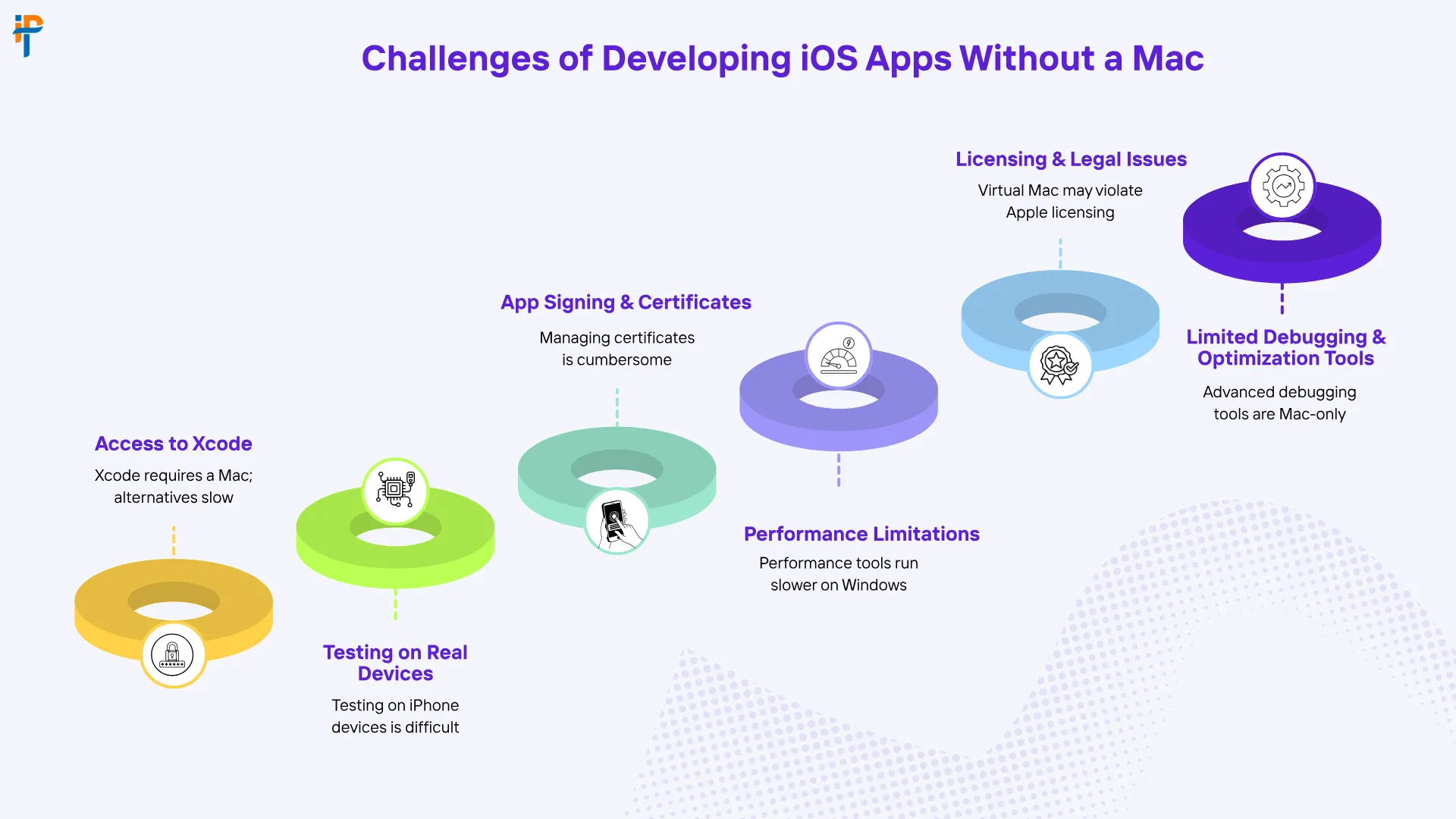
Before we get to the solutions, let’s acknowledge the elephant in the room. Developing iOS apps on Windows isn’t without its headaches. Apple has historically locked iOS development behind its own ecosystem, and that creates some real friction.
Xcode Dependency Issues
Xcode — Apple’s official IDE — is macOS-exclusive. Period. Since iOS app development traditionally relies on Xcode for compiling, building, and packaging apps, Windows users are immediately at a disadvantage. You can’t install Xcode natively on a Windows machine, which means you need workarounds, and some of them are more elegant than others. Think of it like trying to play a PlayStation-exclusive game on an Xbox — the hardware just wasn’t built for it, so you have to get creative.
Simulator and Testing Limitations
Running the iOS Simulator requires macOS. Without it, testing your app’s look and feel on various iPhone or iPad screen sizes becomes a manual, often frustrating process. You’d either need a physical iOS device or a cloud-based testing service — both of which add time and cost to your workflow. It’s doable, but it requires planning and discipline.
Code Signing and Provisioning Hurdles
Apple requires all iOS apps to be signed with valid certificates before deployment. This provisioning process is deeply tied to Xcode and macOS tools. Navigating this on Windows requires third-party services or cloud Mac environments, which can complicate your CI/CD pipeline if you’re not careful. It’s one of those things that sounds simple until you’re three hours deep into a certificate error with a deadline looming.
Top Methods to Develop iOS Apps on Windows
Now here’s where it gets exciting. There’s more than one road that leads to Rome, and there’s definitely more than one way to build an iOS app from a Windows PC. Let’s break down your best options.
Using Flutter for Cross-Platform Development
Flutter, developed by Google, is arguably the most powerful cross-platform framework available in 2026. You write your code once in Dart, and Flutter compiles it natively for iOS, Android, web, and desktop. The best part? You can write and debug most of your Flutter code on Windows. When it’s time to build the iOS-specific binary, you can connect to a remote Mac or use a cloud-based Mac service. Flutter’s hot reload feature means you see your changes instantly on a connected device — it’s like having a live preview of your imagination.
React Native on Windows
React Native is another heavyweight in the cross-platform arena. Built by Meta, it lets you write JavaScript or TypeScript code that renders native iOS and Android components. Microsoft has even maintained a React Native for Windows extension, signaling strong community support. Like Flutter, final iOS builds still require a Mac connection — but development and testing can happen largely on Windows. If your team already knows JavaScript, React Native has an incredibly low learning curve.
Virtual Machines and Cloud-Based Mac Services
This is perhaps the most direct workaround. Services like MacStadium, AWS EC2 Mac instances, and MacinCloud give you remote access to real Mac hardware in the cloud. You connect via remote desktop, run Xcode, and build your iOS app as if you were sitting in front of a Mac. It’s not the snappiest experience, but it gets the job done — especially for final builds and deployments. Think of it as renting a Mac by the hour without ever leaving your desk.
Hackintosh: Worth the Risk?
A Hackintosh involves installing macOS on non-Apple hardware. Technically, you can get Xcode running this way. However, it violates Apple’s End User License Agreement, voids warranties, and creates a maintenance nightmare with every OS update. For professional development teams, this is generally not recommended. We’re mentioning it purely for completeness — not as an endorsement. It’s a bit like building a sports car from salvage parts — impressive if it works, catastrophic if it doesn’t.
Also Read- Online Earning App Development in UAE | Complete 2026 Guide
Step-by-Step Guide: Building Your First iOS App on Windows in 2026
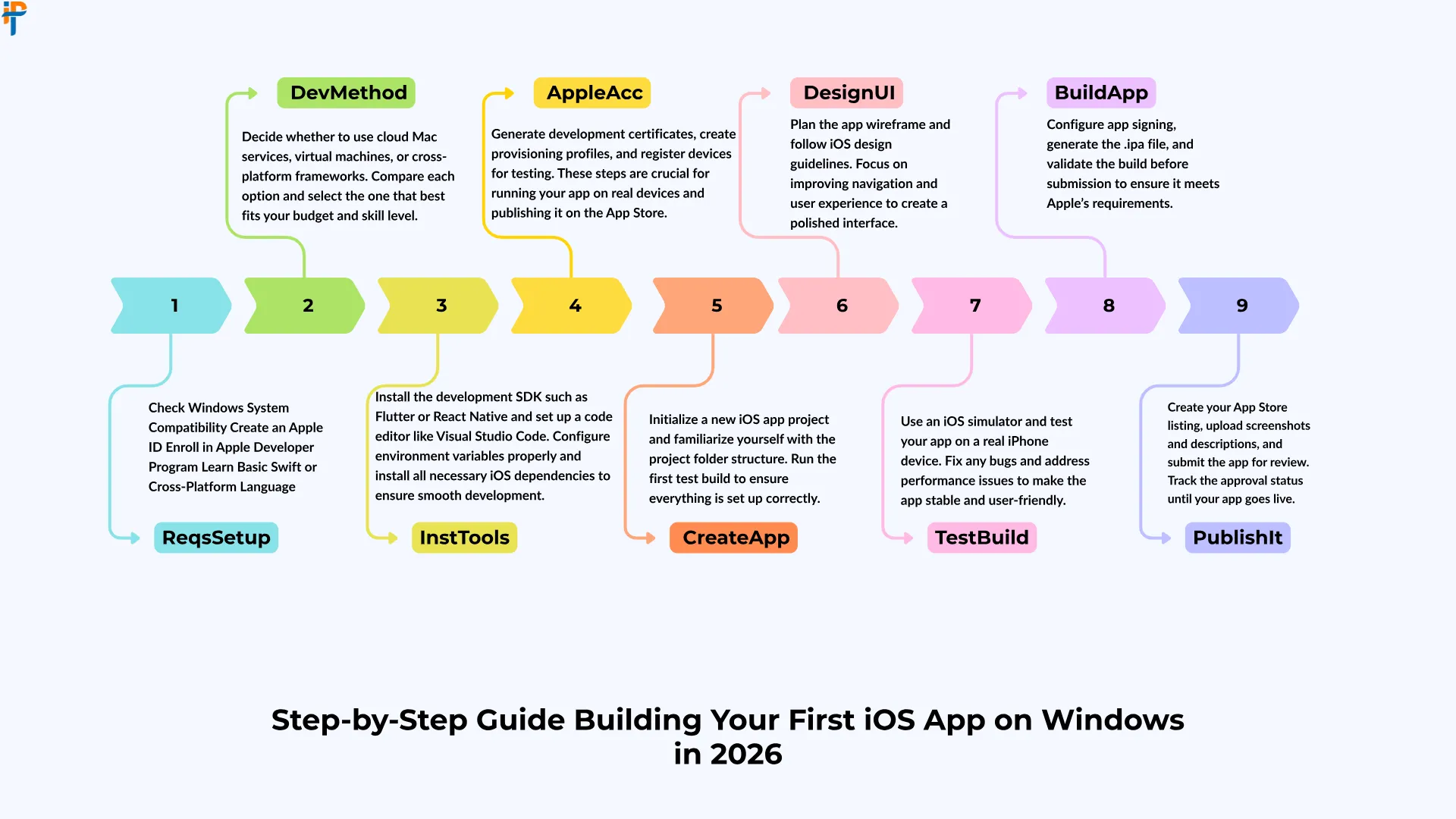
Alright, let’s get practical. Here’s how you can go from zero to a working iOS app using a Windows machine.
Setting Up Your Development Environment
Start by installing the tools you’ll actually need on your Windows PC:
- Node.js — Required for React Native and many JavaScript-based tools.
- Flutter SDK — Download from the official Flutter website and add it to your system PATH.
- Android Studio — Yes, even for iOS development. It provides an excellent emulator and IDE support for Flutter and React Native.
- VS Code — A lightweight, powerful editor with plugins for Flutter, React Native, and Dart.
- Remote Desktop Client — For connecting to cloud-based Mac instances when needed.
Once these are installed, you have a solid foundation. Think of it like laying the groundwork before building a house — you wouldn’t skip the foundation, right?
Choosing the Right Framework
Your framework choice will define your entire development journey. Here’s a quick comparison to help you decide:
| Framework | Language | Windows Dev Support | iOS Build Support | Best For |
|---|---|---|---|---|
| Flutter | Dart | Full | Requires Mac/Cloud | Startups, MVPs |
| React Native | JS/TypeScript | Full | Requires Mac/Cloud | Web devs transitioning |
| Xamarin/.NET MAUI | C# | Full | Requires Mac/Cloud | Enterprise apps |
| Ionic/Capacitor | JS/HTML/CSS | Full | Requires Mac/Cloud | Rapid prototyping |
| NativeScript | JS/TypeScript | Partial | Requires Mac/Cloud | Advanced customization |
Each framework has its sweet spot. Flutter wins on UI consistency, React Native wins on community size, and .NET MAUI wins if your team lives in the Microsoft ecosystem. Choose based on your team’s existing skills and your app’s specific requirements.
Testing and Debugging Your App
Testing is where Windows developers feel the pinch the most. Here are your practical options. First, connect a physical iPhone or iPad via USB and use commands like flutter run to deploy your app directly to the device. Second, use cloud-based device testing platforms that let you run your app on hundreds of real iOS devices remotely. Third, use web-based iOS simulators for basic UI checks without needing any hardware at all.
Using BrowserStack and Other Remote Tools
Cloud testing platforms have become lifesavers for Windows-based iOS developers. You upload your compiled app — built via cloud Mac — and test it on real devices, checking UI behavior, performance, gestures, and more. It’s like having an entire device testing lab in your pocket without the capital expense of owning dozens of phones. Pair this with good logging and crash reporting tools, and your testing workflow becomes surprisingly robust.
Also read- AI Chatbots & Virtual Assistants Boost Conversions 2026
Pros of Developing iOS Apps on Windows
Let’s talk about the bright side — because there are genuine advantages to this approach that often get overlooked in the Mac-versus-Windows debate.
Cost Savings — A capable Windows development machine can be significantly cheaper than a comparable Mac. This matters enormously for startups and small teams where every dollar counts.
Familiar Environment — If you’ve spent years on Windows, staying in that ecosystem means less cognitive friction and higher day-to-day productivity. Learning a new OS while learning a new framework is a recipe for frustration.
Cross-Platform Synergy — Tools like Flutter and React Native naturally push you toward writing code that works on multiple platforms simultaneously, which is a massive business advantage in today’s competitive market.
Flexibility — Windows machines offer far more hardware configurability — more RAM options, better GPUs for faster builds, and more storage choices — all at competitive price points.
Larger Developer Community — Windows has the largest developer base globally, meaning more community support, forums, tutorials, and troubleshooting resources at your fingertips.
Cons and Limitations
No sugarcoating here — there are real limitations you need to plan around before committing to a Windows-based iOS development setup.
No Native Xcode — The inability to run Xcode natively is the single biggest limitation. Every workaround adds a layer of complexity to your workflow that simply doesn’t exist on a Mac.
Remote Mac Latency — Cloud-based Mac services can introduce lag, making development feel sluggish during peak usage times. If your internet connection isn’t stellar, this compounds quickly.
Code Signing Complexity — Managing certificates and provisioning profiles without native Xcode access is painful and error-prone, especially for developers new to the Apple ecosystem.
App Store Submission — Final submission to the App Store still benefits greatly from a Mac environment, and automating this process through CI/CD requires additional setup time upfront.
Performance Testing Gaps — Without a real iOS Simulator, performance profiling and memory analysis are harder and less accurate than they would be on a Mac.
Cost Comparison: Windows vs. Mac for iOS Development
Money talks. Let’s break it down honestly so you can make an informed decision:
| Expense Category | Windows Setup (Annual) | Mac Setup (Annual) |
|---|---|---|
| Hardware | $800–$1,500 (one-time) | $1,300–$3,500 (one-time) |
| Cloud Mac Service | $50–$150/month | Not needed |
| Cloud Device Testing | $199–$399/month | $199–$399/month |
| IDEs & Plugins | Free–$200 | Free–$200 |
| CI/CD Platform | $50–$100/month | $50–$100/month |
Interestingly, the cost difference isn’t as dramatic as you might expect over a full year — especially when you factor in cloud Mac subscription costs. However, if your team already owns Windows machines, the incremental cost of adding cloud Mac access is far lower than purchasing an entirely new fleet of MacBooks. For teams of five or more developers, the Windows approach can generate substantial savings over a two-to-three-year hardware lifecycle.
Also read- Deadly Mobile App Development Mistakes Businesses Must Avoid in 2026
Tips to Maximize Productivity on Windows
Working smarter, not harder — here’s how to squeeze every drop of productivity out of your Windows iOS development setup.
Use CI/CD Pipelines Aggressively. Tools like Codemagic, Bitrise, or GitHub Actions with a macOS runner handle your iOS builds automatically in the cloud. You push code from your Windows machine, and the pipeline compiles and distributes the iOS build without you lifting another finger. It’s like having a robot Mac assistant working for you 24/7.
Leverage Hot Reload. Both Flutter and React Native support hot reload, meaning you see changes in real-time on your connected iOS device without fully rebuilding the app. This dramatically cuts your iteration cycle and keeps you in a productive flow state.
Invest in a Physical iOS Device. If you’re serious about iOS development, owning at least one iPhone is non-negotiable. It’s your most reliable testing tool and costs significantly less than a year of cloud testing subscriptions for basic validation work.
Use VS Code Extensions Wisely. Extensions like Flutter, Dart, React Native Tools, and ESLint can transform VS Code into a near-Xcode-level experience for cross-platform development without any of the macOS overhead.
Stay Organized with Git. Version control isn’t optional — it’s essential. Use GitHub or GitLab to maintain clean branches, especially since you’ll be coordinating between local Windows development and cloud-based Mac builds. A messy repository in this kind of hybrid setup is a recipe for painful debugging sessions.
Future of iOS Development Without Mac
Here’s something to get genuinely excited about: the future looks increasingly bright for Windows-based iOS developers. Several powerful trends are converging to make Mac-free iOS development more viable with each passing year.
Apple’s Evolving Developer Tools — There are strong industry signals suggesting that Apple may eventually offer cloud-based development services, reducing dependency on local macOS hardware for at least some parts of the development workflow.
Improved Cross-Platform Frameworks — Flutter and React Native’s latest architecture releases have dramatically improved performance parity with fully native apps, making the cross-platform approach more compelling than it has ever been before.
AI-Assisted Development — AI coding assistants are leveling the playing field in remarkable ways. Complex, platform-specific code that once required deep Apple ecosystem knowledge can now be generated, reviewed, and debugged far more efficiently — regardless of what OS you’re running.
Progressive Web Apps — While not traditional native iOS apps, Progressive Web Apps continue to improve in capability on iOS Safari, offering yet another path for Windows developers to reach iOS users without ever touching Xcode.
The direction is clear: platform lock-in is loosening, developer tooling is becoming more platform-agnostic, and the community is better positioned than ever to build world-class iOS experiences from any operating system they prefer.
Also read- Machine Learning Mobile Apps: Boost User Experience 2026
Conclusion
Developing iOS apps on Windows in 2026 is not just possible — it’s genuinely practical for the right teams with the right approach. Yes, there are workarounds. Yes, there are limitations. But with frameworks like Flutter and React Native, cloud Mac services, robust CI/CD pipelines, and an ever-growing ecosystem of developer tools, Windows developers are no longer second-class citizens in the iOS world.
The key is choosing the right tools, planning your workflow around the constraints, and partnering with experts who know the terrain inside and out. At IPH Technologies, we specialize in exactly this — turning your vision into a polished, App Store-ready iOS application, regardless of your team’s development environment. With 500+ projects successfully delivered and 430+ satisfied clients across the globe, we’ve navigated every challenge described in this article — and then some. Ready to build something incredible? The journey starts with a single conversation.









.png)