












































































































Zero Trust Architecture for Mobile Apps Complete 2026 Security Guide
Picture this: you’re using your favorite banking app at a coffee shop, sipping your latte, when suddenly your sensitive financial data becomes vulnerable to cyber threats. Scary, right? In today’s hyper-connected world, mobile applications have become the primary gateway to our digital lives, handling everything from financial transactions to healthcare records. But here’s the catch—traditional security approaches just don’t cut it anymore.
Welcome to the world of Zero Trust Architecture, where the motto is simple yet powerful: Never trust, always verify. As we navigate through 2025, implementing Zero Trust in mobile applications isn’t just a best practice—it’s becoming a necessity. Let’s dive deep into how this revolutionary security framework is transforming mobile app development and why your business needs it today.
What is Zero Trust Architecture? A Complete Guide for 2026
The Evolution from Perimeter Security to Zero Trust
Remember the castle-and-moat approach to security? That’s old news. Traditional security models operated on a simple assumption: everything inside the network perimeter was trustworthy, while threats lurked only outside. Think of it like a medieval fortress—once you crossed the drawbridge, you were considered safe.
But here’s the problem: modern cyber threats don’t respect boundaries. With cloud computing, remote work, and mobile devices accessing corporate resources from anywhere, that protective moat has essentially dried up. Attackers who breach the perimeter can move laterally across the network, accessing sensitive data with alarming ease.
Core Definition and Philosophy
Zero Trust Architecture (ZTA) flips the script entirely. Developed by Forrester Research analyst John Kindervag in 2010, this security model operates on three fundamental assumptions:
1. The network is always hostile
2. External and internal threats exist at all times
3. Network location alone doesn’t determine trust
In practical terms, Zero Trust treats every access request as if it originates from an untrusted network. Whether you’re accessing an app from headquarters or a beach in Bali, you’ll need to prove your identity and authorization every single time. It’s like showing your ID at every door in a building, rather than just at the entrance.
According to Google’s initiative, implementing Zero Trust principles can significantly reduce the attack surface by eliminating the concept of a trusted internal network.
Also read- AI Statistics 2026: 77% Are Ahead—Are You Behind?
Why Mobile Apps Need Zero Trust Security Now More Than Ever
The Mobile Threat Landscape in 2025
The statistics are sobering. Mobile devices now account for over 60% of all digital transactions, making them prime targets for cybercriminals. The Verizon Mobile Security Index 2024 revealed that 45% of organizations experienced a mobile security compromise in the past year.
But why are mobile apps so vulnerable? Let’s break it down:
Device Diversity: Unlike controlled desktop environments, mobile devices come in countless configurations, operating system versions, and security patch levels. This heterogeneity creates numerous attack vectors.
App Overload: The average smartphone user has 80+ apps installed, each potentially containing vulnerabilities. One compromised app can serve as a gateway to others.
Network Promiscuity: Mobile devices constantly hop between networks—from home WiFi to public hotspots to cellular data. Each transition presents security risks.
Rising Security Challenges
The sophistication of mobile threats has evolved dramatically. We’re no longer just dealing with simple malware. Today’s attackers employ advanced persistent threats (APTs), man-in-the-middle attacks, and social engineering tactics specifically designed for mobile platforms.
Consider the rise of supply chain attacks targeting mobile SDKs and third-party libraries. When popular development frameworks get compromised, thousands of apps inheriting those components become vulnerable overnight. It’s like discovering the foundation of your house was built with faulty materials—suddenly, everything above it is at risk.
Core Principles of Zero Trust Architecture for Mobile Applications
Never Trust, Always Verify
This is the beating heart of Zero Trust. Every authentication request, every data access attempt, every API call must be verified—no exceptions. Think of it as airport security: even if you’re a frequent flyer, you still go through screening every single time.
For mobile apps, this means implementing robust authentication mechanisms that go beyond simple username-password combinations. We’re talking multi-factor authentication (MFA), biometric verification, device fingerprinting, and contextual authentication that considers factors like location, time, and user behavior patterns.
Least Privilege Access
Why give someone the keys to the entire kingdom when they only need access to one room? The principle of least privilege ensures users and applications receive only the minimum permissions necessary to perform their functions.
In mobile app development, this translates to:
- Role-based access control (RBAC)
- Just-in-time access provisioning
- Time-bound permissions that expire automatically
- Granular API access controls
Micro-Segmentation
Imagine dividing your mobile app’s architecture into countless tiny compartments, each with its own security controls. That’s micro-segmentation. Instead of treating your entire backend as a monolithic trusted zone, you create isolated segments for different functions.
For example, your payment processing module operates in complete isolation from your user profile management system. Even if an attacker compromises one segment, they can’t pivot to others without facing additional authentication barriers.
Continuous Monitoring and Validation
Trust isn’t granted once and forgotten—it’s continuously reassessed. Zero Trust implements real-time monitoring that tracks:
- User behavior patterns
- Device health status
- Network conditions
- Application integrity
- Data access patterns
According to NIST Special Publication, continuous monitoring enables organizations to detect anomalies and respond to threats in real-time, reducing the window of opportunity for attackers.
Also read- 10 MVP Features You Must Have (And 5 to Skip) | 2025 Guide
How to Implement Zero Trust in Mobile App Development: Step-by-Step Guide
Phase 1: Assessment and Planning
Before diving into implementation, you need a comprehensive understanding of your current security posture. Start by mapping your mobile app’s architecture:
Asset Inventory: Document every component—APIs, databases, third-party services, data flows, and user touchpoints. What data does your app handle? Where does it reside? Who needs access?
Risk Assessment: Identify your crown jewels—the most sensitive data and critical functions. A healthcare app’s patient records require different protection levels than a gaming app’s leaderboard data.
Gap Analysis: Compare your current security measures against Zero Trust principles. Where are the vulnerabilities? What’s missing?
Phase 2: Identity and Access Management
Identity becomes your new perimeter. Implement a robust IAM framework that includes:
Strong Authentication:
- Multi-factor authentication combining something you know (password), something you have (device), and something you are (biometrics)
- Adaptive authentication that adjusts security requirements based on risk context
- Passwordless authentication options using FIDO2 standards
Device Verification:
- Device health attestation checking for jailbreaking, rooting, or malware
- Certificate-based device authentication
- Device inventory management
User Context Analysis:
- Geolocation verification
- Behavior-based risk scoring
- Time-based access patterns
Phase 3: Network Segmentation
Transform your monolithic backend into a segmented architecture:
API Gateway Implementation: Create a centralized entry point that authenticates, authorizes, and routes all requests
Service Mesh Deployment: Use technologies like Istio or Linkerd to manage service-to-service communication with built-in security
Microsegmentation: Isolate workloads and apply granular security policies
Encrypted Communications: Implement end-to-end encryption using TLS 1.3 and certificate pinning
Phase 4: Continuous Monitoring
Deploy comprehensive monitoring and analytics:
Security Information and Event Management (SIEM):
- Aggregate logs from all components
- Correlate events to identify suspicious patterns
- Generate real-time alerts
User and Entity Behavior Analytics (UEBA):
- Establish baseline behavior patterns
- Detect anomalies indicating potential compromises
- Automate response to suspicious activities
Compliance Monitoring:
- Track adherence to security policies
- Generate audit trails
- Demonstrate regulatory compliance
Zero Trust Architecture for Different Mobile Platforms: iOS vs. Android
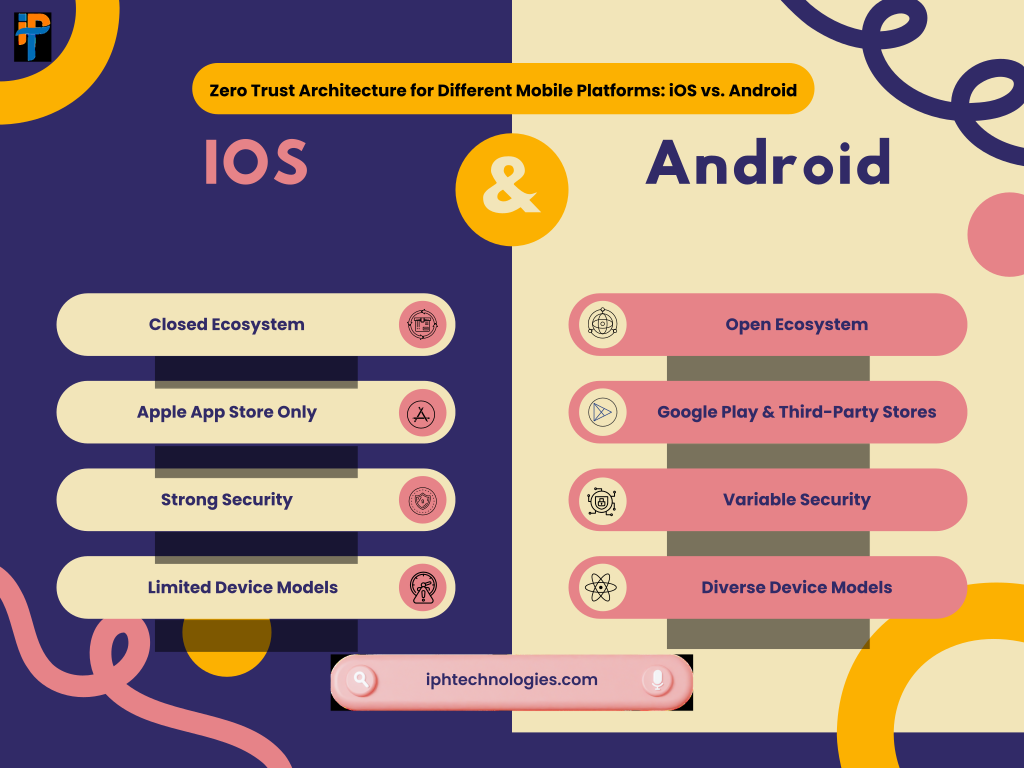
iOS-Specific Considerations
Apple’s ecosystem offers unique advantages and challenges for Zero Trust implementation:
Built-in Security Features:
- App Sandboxing: iOS automatically isolates apps from each other and the system
- Keychain Services: Secure credential storage with hardware-backed encryption
- App Transport Security (ATS): Enforces secure network connections by default
Implementation Tips:
- Leverage Face ID and Touch ID for seamless biometric authentication
- Use Apple’s Secure Enclave for cryptographic operations
- Implement App Attest API to verify your app’s authenticity
- Utilize iOS’s Certificate Transparency for enhanced trust validation
Challenges:
- Limited background processing capabilities affecting continuous monitoring
- Restrictions on accessing device-level security information
- App Store review guidelines requiring careful privacy implementation
Android-Specific Considerations
Android’s open ecosystem demands additional security layers:
Built-in Security Features:
- Android Keystore System: Hardware-backed cryptographic key storage
- SafetyNet Attestation: Verifies device integrity and app authenticity
- Verified Boot: Ensures device hasn’t been tampered with during startup
Implementation Tips:
- Implement Android’s BiometricPrompt API for consistent biometric authentication
- Use WorkManager for secure background task execution
- Leverage Android’s SecurityProvider for up-to-date cryptographic algorithms
- Implement certificate pinning to prevent man-in-the-middle attacks
Challenges:
- Fragmentation across devices and OS versions
- Increased rooting and custom ROM prevalence
- Variable security update deployment across manufacturers
Also read- App Maintenance Costs: What Developers Don’t Tell You
Zero Trust AI/ML The Future of Adaptive Mobile Security
Machine Learning for Behavioral Analytics
Artificial Intelligence supercharges Zero Trust by adding predictive capabilities. Instead of relying solely on predefined rules, AI-driven systems learn normal behavior patterns and identify deviations.
How It Works:
Data Collection: Gather behavioral data—login times, transaction patterns, navigation flows, typing speeds
Pattern Recognition: ML algorithms identify what “normal” looks like for each user
Anomaly Detection: Flag activities that deviate from established baselines
Risk Scoring: Assign dynamic risk scores triggering appropriate security responses
For example, if a user typically accesses your banking app from New York during business hours and suddenly attempts login from Eastern Europe at 3 AM, the AI system might require additional verification steps or temporarily restrict access.
Predictive Threat Detection
Machine learning models can analyze vast amounts of threat intelligence data to predict and prevent attacks before they succeed:
Threat Intelligence Integration: ML systems consume global threat data, identifying emerging attack patterns and proactively updating defenses.
Automated Response: When threats are detected, AI-driven systems can automatically adjust security policies, isolate affected components, or trigger incident response workflows.
Continuous Learning: As the threat landscape evolves, ML models adapt, ensuring your security remains effective against novel attack techniques.
According to research from Gartner, organizations implementing AI-driven security analytics experience 25% faster threat detection and 30% reduction in false positives compared to traditional approaches.
Benefits of Zero Trust Architecture for Mobile App Security
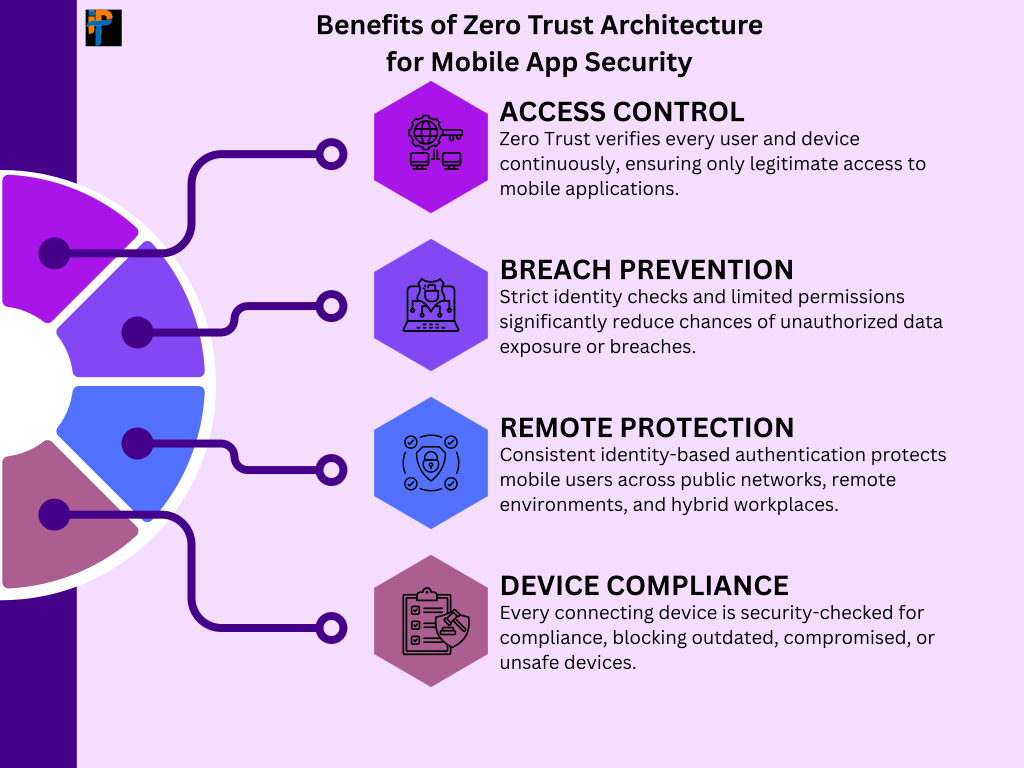
Let’s talk about what Zero Trust actually delivers for your organization:
Enhanced Security Posture
By eliminating implicit trust, you dramatically reduce your attack surface. Every access request faces scrutiny, making lateral movement nearly impossible for attackers. It’s like having a security checkpoint at every door instead of just the building entrance.
Improved Visibility
Zero Trust implementations provide unprecedented insight into your mobile app ecosystem. You’ll see exactly who’s accessing what, when, and from where. This granular visibility enables faster threat detection and more informed security decisions.
Reduced Breach Impact
When breaches do occur (and let’s be honest, no system is 100% impenetrable), micro-segmentation limits the blast radius. An attacker compromising one component doesn’t automatically gain access to your entire infrastructure.
Regulatory Compliance
Zero Trust principles align beautifully with regulatory requirements from GDPR, HIPAA, PCI-DSS, and others. The continuous monitoring, access logging, and data protection mechanisms inherent in Zero Trust make compliance demonstration straightforward.
Better User Experience
Paradoxically, stronger security often improves user experience. Adaptive authentication means low-risk activities flow seamlessly while only suspicious actions trigger additional verification. Users appreciate not jumping through hoops for routine tasks.
Business Agility
Zero Trust enables secure digital transformation. Whether you’re adopting cloud services, supporting remote workers, or launching new mobile initiatives, Zero Trust provides the security foundation to move fast without compromising safety.
Also read- Top 12 Tech Companies in the UAE for Your Next Project
Zero Trust for Compliance Meeting Regulatory Requirements
Navigating the alphabet soup of compliance frameworks can feel overwhelming, but Zero Trust actually simplifies the journey:
| Regulation | Zero Trust Alignment | Key Benefits |
|---|---|---|
| GDPR | Data minimization, access controls, audit trails | Demonstrates technical measures for data protection, simplifies breach notification requirements |
| HIPAA | Encryption, access logging, minimum necessary access | Satisfies technical safeguards, administrative controls, and audit requirements |
| PCI-DSS | Network segmentation, strong authentication, monitoring | Meets requirements 1-12 including access control, network protection, and monitoring |
| SOC 2 | Continuous monitoring, incident response, access management | Addresses security, availability, confidentiality principles comprehensively |
| CCPA | Data access controls, consumer rights management | Enables consumer data access, deletion, and opt-out rights implementation |
Documentation and Audit Trails
Zero Trust’s continuous logging creates comprehensive audit trails demonstrating compliance. Every access request, authentication attempt, and data modification gets recorded with contextual information including:
- User identity and device information
- Timestamp and geolocation
- Resources accessed
- Actions performed
- Access decisions and justifications
This documentation proves invaluable during audits, reducing preparation time and demonstrating due diligence.
Risk Management Framework
Zero Trust operationalizes risk management by:
1. Identifying: Continuous asset discovery and classification
2. Assessing: Real-time risk scoring based on contextual factors
3. Mitigating: Automated policy enforcement and access decisions
4. Monitoring: Ongoing validation and anomaly detection
Challenges and Best Practices in Zero Trust Implementation
Let’s be real—implementing Zero Trust isn’t a walk in the park. Here are the common obstacles and how to overcome them:
Challenge 1: Organizational Resistance
Zero Trust requires cultural change. Teams accustomed to implicit trust may resist additional authentication steps and access restrictions.
Best Practice: Start with education. Help stakeholders understand the “why” behind Zero Trust. Demonstrate quick wins with pilot projects targeting high-risk areas. Involve users early in the design process to address usability concerns proactively.
Challenge 2: Legacy System Integration
Your shiny new Zero Trust architecture needs to coexist with existing systems that weren’t designed with these principles in mind.
Best Practice: Adopt a phased approach. Begin with new mobile apps and gradually extend Zero Trust controls to legacy systems. Use API gateways and reverse proxies as compatibility layers. Consider this a journey, not a destination.
Challenge 3: Performance Concerns
Additional authentication and encryption inevitably introduce latency. Users won’t tolerate sluggish apps, regardless of security benefits.
Best Practice: Optimize ruthlessly. Implement caching for authentication tokens, use efficient encryption algorithms, leverage edge computing for geographically distributed users, and continuously monitor performance metrics. Modern Zero Trust solutions, when properly implemented, add minimal overhead.
Challenge 4: Complexity Management
Zero Trust architectures involve numerous components—IAM systems, policy engines, monitoring platforms, encryption layers. Managing this complexity requires specialized expertise.
Best Practice: Leverage managed services and integrated platforms rather than building everything from scratch. Partner with experienced providers (like IPH Technologies) who’ve navigated these waters before. Invest in automation to reduce operational burden.
Best Practices Table:
| Implementation Phase | Best Practices | Common Pitfalls to Avoid |
|---|---|---|
| Planning | Conduct thorough risk assessment, define clear objectives, secure executive buy-in | Underestimating scope, ignoring user experience, lacking clear success metrics |
| Deployment | Start with pilot projects, implement gradually, maintain backward compatibility | Big bang approach, insufficient testing, inadequate rollback plans |
| Operation | Automate policy enforcement, continuously monitor and adjust, provide user training | Manual processes, static policies, insufficient documentation |
| Optimization | Gather feedback, measure performance, iterate based on lessons learned | Set-it-and-forget-it mentality, ignoring metrics, resisting changes |
Also read – Build a Fundable MVP in 2025: The Ultimate Founder’s Guide
How IPH Technologies Implements Zero Trust in Mobile App Development
At IPH Technologies, we don’t just talk about Zero Trust—we live it. With over 500 successful projects and 430+ satisfied clients, we’ve refined our approach to mobile app security through real-world experience.
Our Zero Trust Development Methodology
1. Security-First Architecture Design
We architect your mobile app with Zero Trust principles baked in from day one, not bolted on as an afterthought. Our design process includes:
- Threat modeling specific to your business domain
- Data flow mapping identifying sensitive information paths
- Component isolation strategies for maximum segmentation
- Defense-in-depth layering across all architectural tiers
2. Comprehensive Identity Management
We implement robust IAM frameworks tailored to your specific requirements:
- Custom authentication flows balancing security and user experience
- Integration with enterprise identity providers (Azure AD, Okta, Auth0)
- Biometric authentication leveraging platform-specific capabilities
- Contextual access decisions based on risk factors
3. Platform-Optimized Security
Whether you need iOS, Android, or cross-platform apps, we leverage native security features:
- iOS: Keychain Services, Secure Enclave, App Attest
- Android: Keystore System, SafetyNet, BiometricPrompt
- Cross-platform: React Native security modules, Flutter secure storage
4. Advanced Monitoring and Analytics
We deploy comprehensive monitoring capturing security-relevant events:
- Real-time threat detection using ML-powered analytics
- Automated incident response workflows
- Compliance reporting dashboards
- Performance monitoring ensuring security doesn’t compromise user experience
5. Continuous Security Validation
Security isn’t a one-time checkbox—it’s an ongoing commitment:
- Regular penetration testing and vulnerability assessments
- Code reviews focused on security best practices
- Dependency scanning for vulnerable third-party components
- Security patch management and rapid response to emerging threats
Case Study Snapshot
We recently partnered with a fintech startup launching a mobile investment platform. Their requirements included:
- Bank-level security for financial transactions
- Seamless user experience for daily trading activities
- Compliance with SEC and FINRA regulations
- Scalability for rapid user growth
Our Zero Trust implementation delivered:
- Zero security incidents in the first year of operation
- 4.8-star app store ratings highlighting seamless experience
- Full regulatory approval on first audit
- Infrastructure scaling smoothly from 10,000 to 500,000 users
Why Choose IPH Technologies?
Proven Expertise: Our team brings decades of combined experience in mobile security and Zero Trust implementations across industries including finance, healthcare, retail, and enterprise.
Agile Methodology: We use iterative development approaches ensuring you see value quickly while maintaining flexibility to adapt to changing requirements.
End-to-End Support: From initial consultation through development, deployment, and ongoing maintenance, we’re your partner at every stage.
Technology Agnostic: We recommend the best solutions for your specific needs rather than pushing proprietary technologies.
Commitment to Excellence: Our track record of 500+ successful projects speaks to our dedication to delivering exceptional results on time and within budget.
Ready to future-proof your mobile app with Zero Trust security? Contact IPH Technologies today for a consultation tailored to your unique requirements.
Conclusion: Future-Proof Your Mobile App with Zero Trust
We’ve covered a lot of ground, haven’t we? From understanding Zero Trust fundamentals to exploring real-world implementations, one thing should be crystal clear: Zero Trust Architecture isn’t just a buzzword—it’s the security foundation your mobile apps need to thrive in 2025 and beyond.
The mobile threat landscape will only grow more sophisticated. Attackers are investing heavily in new techniques specifically targeting mobile applications. The question isn’t whether your app will be targeted, but when. Zero Trust provides the resilience to withstand these inevitable attacks and the agility to adapt to emerging threats.
Remember, implementing Zero Trust is a journey, not a destination. Start with assessment, prioritize based on risk, implement incrementally, and continuously improve. You don’t need to boil the ocean on day one—focus on protecting your most critical assets first and expand from there.
The organizations thriving in our interconnected world are those treating security as an enabler of innovation rather than an obstacle. Zero Trust architecture allows you to move fast without breaking things, to embrace cloud and mobile technologies while protecting what matters most, and to build trust with users by demonstrating your commitment to their security.
Whether you’re launching a new mobile app or modernizing an existing one, now is the time to embrace Zero Trust principles. Your users’ data, your brand reputation, and your business continuity depend on it.
Ready to take the next step? Partner with experts who’ve walked this path before. At IPH Technologies, we’re committed to helping you navigate the complexities of Zero Trust implementation, delivering secure, high-performing mobile applications that exceed your expectations.










.png)